

As an Amazon Associate we earn from qualifying purchases. If you buy through links on this page we may receive a commission at no extra cost to you. Product details come from Amazon listings and can change.
Finding the best bluetooth adapters is easier once you know which direction the audio needs to travel. Some adapters add Bluetooth to a computer, some turn an old stereo or car aux jack into a wireless receiver, and others send sound from a seatback screen or game console to your headphones. This guide covers all three jobs in one place so you can match the box to your gear instead of guessing.
The ten picks below are written for PC users, home stereo owners, drivers, console gamers and frequent travelers. Each entry explains what the product is, how its main features work, who it suits and what to double check before you order. Pay special attention to the receiver or transmitter notes, because mixing them up is the most common mistake with this kind of gadget.
Prices and stock change often, so we do not print any numbers here. Every product links to its live listing, where you can see the current price, the exact variant and the latest compatibility notes from the seller.
Our top pick is the TP-Link UB500 USB dongle, a tiny Bluetooth 5.4 adapter for Windows PCs. For a home stereo, the 1Mii B06Pro adds long range and optical or coaxial inputs. Travelers sharing a flight should look at the Avantree Relay, while PS5 and Switch players can choose the UGREEN USB-C transmitter.
Key Takeaways
Best Bluetooth Adapters at a Glance
| Product | Our score | |
|---|---|---|

TP-Link USB Bluetooth Adapter for PCBest Overall
|
9.0 / 10 | Check Price → |

UGREEN USB Bluetooth 5.3 Adapter for PC Bluetooth DongleBest for Multiple Devices
|
8.8 / 10 | Check Price → |
![[Upgraded] 1Mii B06Pro Long Range Bluetooth Receiver](https://m.media-amazon.com/images/I/51uUtN-XmHL._AC_SL1000_.jpg)
[Upgraded] 1Mii B06Pro Long Range Bluetooth ReceiverBest Long Range Receiver
|
8.8 / 10 | Check Price → |

1Mii B06+ Bluetooth ReceiverBest for Home Stereo
|
8.8 / 10 | Check Price → |
| 9.2 / 10 | Check Price → | |
Esinkin Bluetooth Audio Adapter for Music Streaming Sound SystemBest Simple Receiver
|
9.0 / 10 | Check Price → |

UGREEN USB-C Bluetooth Adapter for PS5 with APTX LowBest for PS5 and Switch
|
8.8 / 10 | Check Price → |

Avantree RelayBest for Sharing on Flights
|
8.6 / 10 | Check Price → |

Twelve South AirFly SEBest for Gym and Travel
|
8.6 / 10 | Check Price → |
2026 Upgrade Pro Bluetooth 6.0 Transmitter ReceiverBest 2 in 1 Adapter
|
8.6 / 10 | Check Price → |
How We Chose the Best Bluetooth Adapters
This is a research based guide, not a lab comparison. We read each listing closely, including the title, the feature bullets and the compatibility notes, then compared the products on specs, features and how well they fit a clear use case. Where a detail is missing from the listing, we describe the technology in general terms instead of guessing.
Every pick also carries an editorial score out of 10, shown separately on the site. The score reflects how well the product matches its stated job, how clearly the seller explains limits such as receiver only or Windows only, and how useful the extras are. We dropped duplicate listings of the same model and left out car FM transmitters, because they solve a different problem.
In-Depth Reviews
1TP-Link USB Bluetooth Adapter for PC
The TP-Link UB500 earns the top spot because it solves the most common Bluetooth problem with the least fuss. It is a small USB dongle that gives a desktop or laptop without built-in Bluetooth a modern wireless connection. The listing highlights Bluetooth 5.4 with EDR, plus backward compatibility with older versions all the way down to 1.1, so even a very old phone or headset should still be able to pair with it. That mix of modern features and a very low barrier to entry is why it leads the list for most readers.
Technically, the adapter combines enhanced data rate for faster transfers with Bluetooth low energy for efficient power use. The seller says it offers up to twice the speed and four times the coverage of Bluetooth 4.0, which matters for steady audio streaming. The nano body is meant to stay in the port permanently, so you can leave it in a laptop bag or a desktop and forget about it. In practice this means fewer dropped connections when a headset, a mouse and a phone all share the same small radio.
This model suits students, home office workers and casual gamers who want wireless headphones, a mouse or a keyboard on a PC. The listing mentions desktops, printers, phones and headsets as typical partners. Windows 8.1, 10 and 11 are covered by plug and play setup, which makes it friendly for anyone who dislikes installing software or hunting through settings menus. It is also an easy upgrade for anyone whose motherboard has no wireless chip or whose built-in Bluetooth has become unreliable.
A few practical points are worth knowing. The seller says an internet connection is needed for automatic driver setup on Windows, and Windows 7 requires a manual driver download from the maker. To actually use the newest Bluetooth 5.4 features you should install the latest driver. Keep the dongle on a front or side port if your PC sits under a desk, since a clear path helps signal strength. Treat the listed speed and range comparisons as guidance from the seller rather than a measured result for your own room.
Bluetooth 5.4 with EDR and BLE
Tiny enough to leave plugged in
Plug and play on Windows 8.1, 10 and 11
Backward compatible with older devices
Windows 7 needs a manual driver
Sold for PC use, not as an audio receiver
2UGREEN USB Bluetooth 5.3 Adapter for PC Bluetooth Dongle
The UGREEN USB Bluetooth 5.3 adapter is the pick for people who juggle several wireless gadgets at the same desk. Its headline feature is support for up to five Bluetooth devices connected at once, such as a mouse, a keyboard, a phone and a pair of headphones. That makes it a neat way to clear cable clutter from a workstation without buying separate receivers for each accessory. That limit is worth remembering when you plan which accessories will share the dongle.
Under the hood, the dongle uses Bluetooth 5.3 with BR and EDR technology, which the seller says improves connection stability, lowers power draw and reduces the chance of dropouts. The listing adds that devices of the same type may compete, so two audio devices will not play at once. Think of the five device limit as a count of different categories rather than five speakers. For home offices, this kind of low power link helps a wireless mouse and keyboard stay responsive through a busy workday.
It fits office workers, remote learners and anyone building a tidy desk setup around a Windows laptop or tower. The mini body is described as small enough that it will not block neighboring USB ports, which helps on slim laptops with only two or three sockets. No driver installation is needed on Windows 11, 10 and 8.1, so setup should be quick. The small footprint also makes it a decent travel companion for a work laptop that only has a couple of ports.
Read the compatibility note carefully before buying. The seller states that the adapter works with Windows systems only, and that Windows 7, Linux and macOS are not supported. If it does not work at first, the listing advises disabling any other Bluetooth device inside Device Manager, then reinserting the dongle. Mac and Linux owners should look at a different adapter instead. In short, it is a tidy choice for Windows desks, but it is the wrong tool for anything that is not a Windows machine.
Lists up to five connected devices
Bluetooth 5.3 BR+EDR for stable links
No driver needed on modern Windows
Mini body saves port space
Windows only, no Mac or Linux support
Same type audio devices may conflict
3[Upgraded] 1Mii B06Pro Long Range Bluetooth Receiver
The 1Mii B06Pro is built for people who want to stream from a phone to a serious home stereo without sitting beside it. Dual antennas and Class 1 Bluetooth are the headline features, and the seller claims up to 197 feet in open air and roughly 60 to 100 feet indoors without obstacles. That claim is for ideal conditions, but it shows the design target is whole room or whole floor listening. That is a lot of reach for a small box, though you should still place it with a clear view of the room.
Connection options are unusually broad for this category. You can run it to an amplifier through optical, coaxial, RCA or a 3.5 mm cable, which means it fits modern soundbars and older receivers alike. The Bluetooth 5.3 chip supports aptX HD and aptX Low Latency, so a phone that also supports those codecs can deliver higher quality audio and tighter lip sync with video. Having several output types on one adapter also means it can move with you if you later replace the amplifier or add a soundbar.
Day to day use is simple. Buttons on the unit raise or lower the volume, and a two second hold skips to the next or previous track, which saves reaching for your phone. The listing also explains that it can be paired with a smart speaker app so you can start music by voice. It suits living rooms, home offices and workshops that already have decent speakers. The extra controls make it pleasant to use when your phone is charging in another room or tucked in a pocket.
Be sure you understand what it does not do. The listing is clear that this is a receiver only, so it cannot connect to Bluetooth headphones or televisions as a transmitter. It also warns that Wi-Fi routers and walls can shorten range. If your amplifier lacks a digital input, use the analog cable and expect the conversion to happen inside the adapter. If you only need a basic analog connection and short range, a simpler model may be all you need.
Dual antennas and Class 1 range
Optical, coaxial, RCA and 3.5 mm outputs
Supports aptX HD and aptX Low Latency
Volume and track buttons on the unit
Receiver only, cannot send audio to headphones
Range figures depend on open space and Wi-Fi noise
41Mii B06+ Bluetooth Receiver
The 1Mii B06+ is a straightforward way to bring wireless music to an amplifier, powered speakers or a stereo that predates Bluetooth. The listing frames it as an upgrade for existing equipment, so you keep the speakers you already love and simply add a modern input. It is the more compact sibling of the Pro model, with fewer connection types but the same focus on sound quality. That makes it a tidy fit for a bookshelf system or a small hi-fi corner.
Its Bluetooth 5.3 chip supports aptX HD and aptX Adaptive, along with a 3D surround effect. Those codecs only matter when your phone, tablet or laptop supports them too, but they give compatible devices more room for detail than basic SBC. The seller also lists Class 1 range of about 98 feet in open air and roughly 50 to 70 feet indoors without obstacles. Because it can talk to two sources, a household with two phones is less likely to argue about who has to reconnect.
Two features stand out for shared homes. The adapter can power on automatically when plugged in and reconnect to the last paired device, so music starts without fiddling. It can also pair with two devices at once, which lets two people switch audio sources without repeating the pairing steps. A USB power adapter is included, and you connect it with a 3.5 mm or RCA cable. The included power adapter means you can plug it in and get moving without searching for a charger.
Before ordering, check the back panel of your stereo for a matching analog input, since this model does not list optical or coaxial output. The listing states that it is a Bluetooth receiver, so it will not feed headphones. Place it away from large metal shelving and routers, and set the source volume near maximum while using the stereo knob for control. It is a good fit for anyone who wants decent codec options without paying for extra inputs they will never use.
Supports aptX HD and aptX Adaptive
Pairs with two devices at once
Automatic power on and reconnect
USB power adapter included
No optical or coaxial output listed
Receiver only, no transmitter mode
5UGREEN Aux to Bluetooth 6.0 Adapter 3.5mm Bluetooth Receiver

The UGREEN Aux to Bluetooth 6.0 adapter is aimed squarely at vehicles that have a 3.5 mm aux jack but no built-in Bluetooth. You plug it into the aux port, power it from a USB port, and your phone can stream music or handle calls through the car speakers. The seller also notes it can work with home audio systems and powered speakers that have an aux input. That keeps the setup practical for a daily drive and for short trips in a rental car that has the right ports.
The listing describes a Bluetooth 6.0 chipset with a stable connection up to about 100 feet, and it names SBC as the supported codec. SBC is the universal baseline, so it works with practically every phone. A built-in microphone enables hands-free calls, which is useful because it keeps your eyes on the road and your phone out of your hand. In plain terms, you get a single small gadget that handles both music and calls without replacing the head unit.
Daily use is designed to be automatic. The adapter remembers up to five paired devices and reconnects to your phone when the car starts, so a commute needs no extra taps. Zinc alloy connectors and a flexible TPE cable, listed in lengths from 0.3 to 1.5 meters, point to a durable build. It suits commuters, rideshare drivers and owners of older cars. It also works around the house if you want to wake up a spare speaker with an aux input and a nearby charger.
Check your dashboard first. The seller says you need both a 3.5 mm aux port and a USB port for power, because there is no built-in battery. It works in receiver mode only, so it will not pair with wireless headphones. Route the cable away from the gear shift, and keep call volume at a comfortable level, since road noise can tempt you to turn everything up. If your car has no aux input at all, a different type of adapter will be needed instead.
Built-in microphone for hands-free calls
Remembers up to five paired devices
Zinc alloy connectors and flexible cable
Reconnects automatically when the car starts
Needs both an aux jack and a USB port
Receiver mode only, SBC codec listed
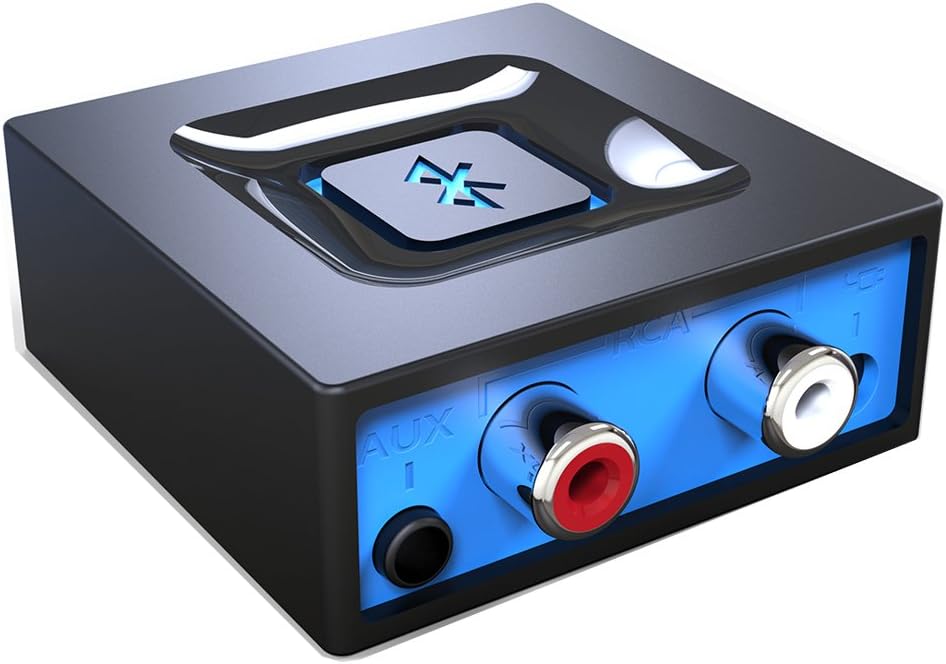
6Esinkin Bluetooth Audio Adapter for Music Streaming Sound System
The Esinkin Bluetooth audio adapter is the no frills choice for turning wired speakers into wireless ones. It is a small receiver that connects to computer speakers, a home stereo or a powered speaker through a 3.5 mm or RCA cable. After that, a smartphone or tablet can stream music to it, which makes it a handy fix for an older sound system that still sounds good. That simplicity is its main selling point, especially for relatives who do not want to learn new menus.
Control comes down to one large Bluetooth symbol button in the middle of the unit. A single press connects or disconnects a device, and holding it for three seconds switches the adapter on or off. The listing says it reconnects automatically to a device it has paired with before, so after the first setup you should only need to open your music app and press play. It is a gentle way to rescue speakers that are too good to throw away but too old to connect to a phone.
This is a sensible match for a bedroom, a garage or a spare desk speaker setup where you do not need advanced codecs or multiple inputs. The seller gives an indoor range of about 30 to 40 feet without obstacles, which covers a typical room and a bit beyond. It lists smartphones, tablets, computers and laptops as compatible sources. For a workshop, a shop counter or a dorm desk, this kind of basic receiver is often all that is needed.
Know the limits before buying. The seller notes there is no built-in battery, so you must power it from an AC to DC adapter or a USB cable. It is a receiver only, not a transmitter, and is intended just to give Bluetooth to an existing stereo, powered speaker or public address system. Walls and other wireless gear can reduce the quoted range, so place it near the speakers. Do not expect advanced features such as codec switching or optical inputs, because the listing does not mention them.
One button pairing and power control
Works with 3.5 mm or RCA cable
Reconnects automatically
Simple to understand and set up
No built-in battery, needs wall or USB power
Shorter listed range than Class 1 rivals
7UGREEN USB-C Bluetooth Adapter for PS5 with APTX Low
The UGREEN USB-C Bluetooth adapter is a transmitter for gamers who want wireless headphones on a console or computer. It plugs into a USB-C port on a PS5, a Switch or a Windows or macOS computer and sends audio to Bluetooth headphones or a speaker. The listing stresses that it needs no drivers or software, and that it adds audio capability only, with no data connection. That feature set is aimed squarely at people who play late or share a room with others.
Its main strength is codec choice. A key switch selects between aptX, aptX Adaptive Low Latency, aptX Adaptive High Quality, aptX HD and SBC, and indicator lights show the active mode. The seller says the low latency mode keeps audio delay under 100 milliseconds, which is meant to keep sound and picture in step. Headphones must support the same codec to benefit. It is a handy way to keep your favorite headphones in use rather than buying a second, console specific pair.
This model suits console players who prefer their own Bluetooth headphones over a branded gaming headset. It also works for watching films on a laptop late at night without disturbing others. Remember to keep the volume at a moderate level during long sessions, because wireless freedom makes it easy to forget how loud you have set things. A film on a laptop is another natural use, since low delay helps dialogue match the picture on screen.
There are several compatibility warnings worth reading. The listing says it is not compatible with PS4, the PS5 Portal or Linux, and that it does not work with one specific earbud model or its dual device pairing feature. The microphone is off by default, because Bluetooth calling mode is disabled until you double click the multifunction button. Voice chat on a headset may therefore need that step. Because compatibility rules are strict, read the full list of notes on the live page before you commit.
Selectable aptX Low Latency and HD modes
Plug and play with no drivers
Works with PS5, Switch, Windows and macOS
LED lights show the active codec
Not compatible with PS4, PS5 Portal or Linux
Microphone calling mode is off by default
8Avantree Relay
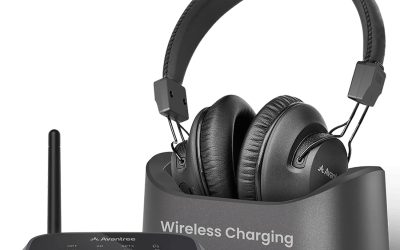
The Avantree Relay is a travel transmitter designed so two people can watch the same seatback screen with their own wireless headphones. You plug it into the 3.5 mm audio jack, put the earbuds or headphones in pairing mode and connect, which the seller describes as a simple three step process. A dual prong airplane adapter is included in the box. That means a pair of travelers can enjoy the same film without sharing a single set of earbuds.
The sound side is handled by aptX Adaptive and aptX HD support, which the listing says can deliver stable and detailed audio when paired with compatible headphones. Battery life is listed at up to 25 hours, along with onboard volume controls and a battery indicator. Those figures suggest it can cover a long haul flight and a return trip without a recharge. Seat controls vary by airline, so the onboard volume controls are a useful detail.
This is an easy gift for couples, parents traveling with older children, and friends who like watching the same film. It also suits gym equipment or any other device with a 3.5 mm output, as long as you want sound sent to wireless headphones. Because it shares audio with two listeners, it removes the need to pack a tangle of wired earbuds. It also fits well in a carry on, since the adapter is small and the airplane plug sits in the same pouch.
Read the warning in the listing before you buy. The Relay is a transmitter only, with no microphone, and is not meant for phone calls, televisions, hearing aids, musical instruments or receiving audio. Check that your seat has a standard 3.5 mm jack, and set the volume low before you press play. Inflight noise tempts listeners to turn up the sound, so check levels now and then. If you need phone calls or television use, look at a two mode adapter instead of this one.
Pairs with two sets of headphones
Supports aptX Adaptive and aptX HD
Up to 25 hours listed battery life
Dual prong airplane adapter included
Transmitter only, no microphone
Not meant for TVs, calls or receiving audio
9Twelve South AirFly SE
The Twelve South AirFly SE is a pocket sized transmitter that lets wired audio sources talk to wireless earbuds or headphones. The seller names in-flight entertainment, gym equipment, gaming devices and any 3.5 mm audio jack as targets. That makes it more of a general purpose travel tool than a single trick gadget, and the SE name points to a simpler, more affordable version of the AirFly idea. That versatility makes it a sensible, low stress addition to a travel kit or a gym bag.
Power is a strong point on paper. The listing promises more than 20 hours of playback on one charge, and it can be used while charging through the included USB-C cable, so a flat battery during a long trip is less of a worry. Built in volume buttons let you adjust level at the dongle itself, which helps when the source device has weak or awkward controls. Being able to charge while listening means a long layover does not have to end your film early.
Typical owners are frequent flyers, treadmill regulars and anyone who has ever been stuck with a wired headset that does not reach. Pairing is described as quick, and the unit is light enough to clip into a bag pocket or a carry case. It also works for a shared TV room if the source has a headphone output and the viewer wants private sound. It is also useful at home when a wired device needs to reach wireless headphones across the couch.
Keep expectations realistic. The listing does not mention extra features such as two headphone sets, a microphone or a codec list, so treat it as a basic transmitter for casual listening. It sends audio out and does not receive it. Always check the seat jack type on your airline, bring a charging cable, and listen at a modest volume, especially over long journeys. If you want more headline features, check the other transmitters in this guide before deciding.
Pairs with earbuds and wireless headphones
20+ hours of listed playback
Can be used while charging over USB-C
Compact and easy to carry
No codec or dual headphone details listed
Transmitter only, not a receiver
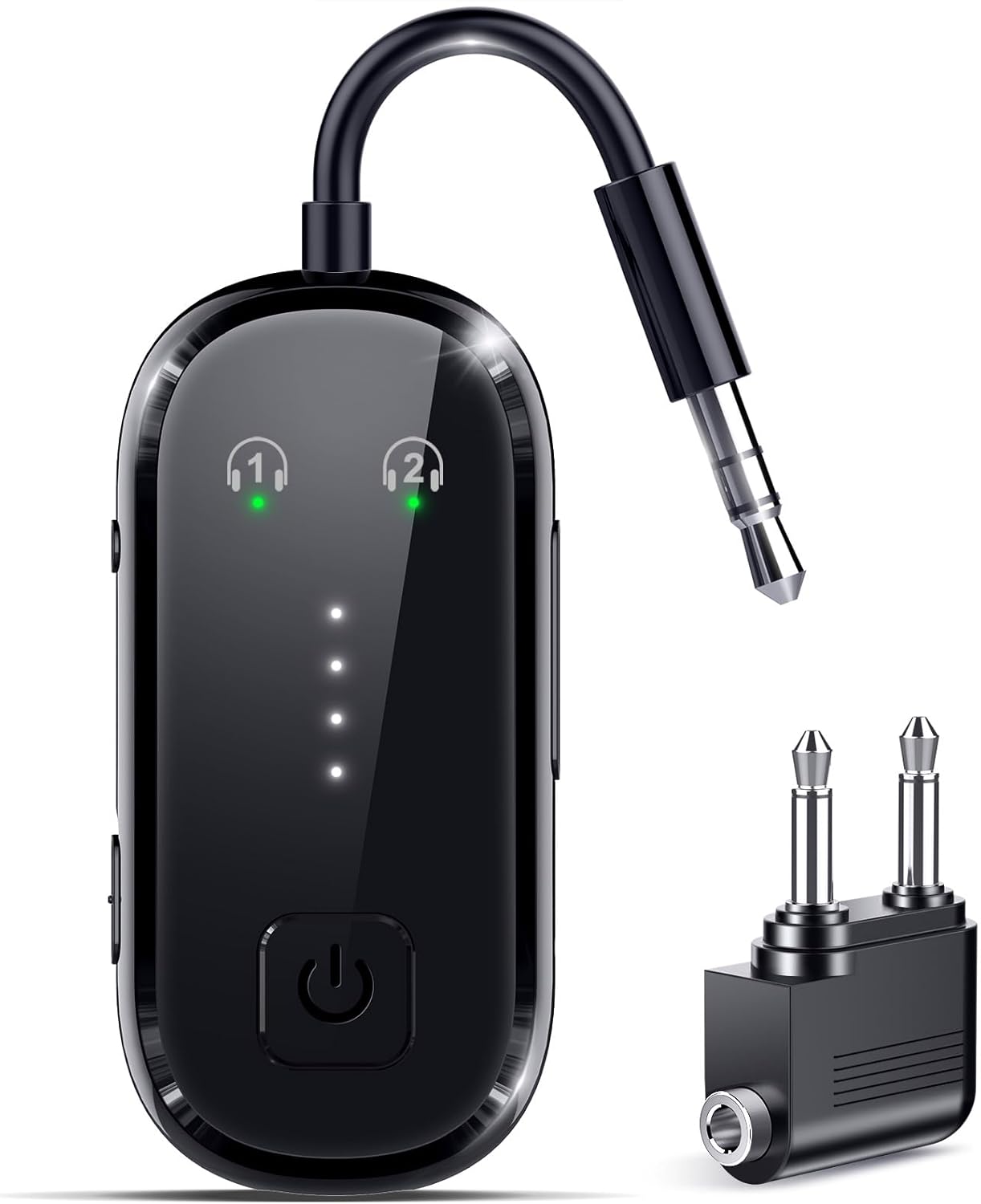
102026 Upgrade Pro Bluetooth 6.0 Transmitter Receiver
The 2026 Upgrade Pro Bluetooth 6.0 adapter earns its place by doing two jobs in one small body. In transmitter mode it sends audio from an aux or RCA source, such as a television or a seatback screen, to wireless headphones. In receiver mode it does the reverse and brings Bluetooth to a wired speaker or car system. The listing uses generic branding, so judge it from its stated features. That flexible design is the reason it sits in the list despite its generic branding.
Features revolve around flexibility. The seller says it can connect two sets of headphones at once in transmitter mode and pair two smartphones in receiver mode for easy switching. Auto pairing starts when it powers on, and it stores past connections for quick reconnection. Dedicated buttons handle volume and mode, while LED indicators show battery level and connection status. A single unit that can send or receive saves both money and space in a travel bag.
Battery claims are generous, with over 20 hours of playback and a full charge in about 1.5 hours over USB-C, with use while charging allowed. A cable storage design and a lightweight build target travel use. It suits people who want one gadget for the flight, the gym, the living room television and the car, instead of buying separate transmitters and receivers. It will appeal most to people who like to switch between a flight, a living room and a car with a single device.
As with any versatile gadget, check the details. The listing mentions FCC, CE, RoHS and BQB certifications, which is reassuring but is not a performance guarantee. Codec support is not named, so audio quality and delay will depend on the connected gear. You must remember to switch between modes, because leaving it in the wrong mode is the usual reason it seems not to work. Because the details are brief, read the seller notes closely and keep your expectations modest.
Transmitter and receiver in one unit
Connects two headphone sets in TX mode
USB-C charging in about 1.5 hours
Listed safety certifications
Codec support is not named in the listing
Generic brand with less detail than rivals
How to Choose the Best Bluetooth Adapters
Receiver, transmitter or USB dongle: what do you need?
The first step is to work out which way the sound must travel. A receiver takes audio from your phone and plays it through a stereo, car or speaker. A transmitter sends audio from a TV, console or seatback screen to Bluetooth headphones. A USB dongle gives a computer the Bluetooth radio it is missing, so it can talk to many accessory types. Once you know that, every listing becomes much easier to read, because the key words jump out immediately.
Buying the wrong type is the single most common error, and it is easy to avoid. Read the first line of the listing for the words receiver, transmitter or RX and TX. Several products in this guide are one way only, and the sellers say so openly. A two mode adapter costs a little more but removes the guesswork if your plans might change. A quick sketch of your devices on paper can help, with arrows showing where the audio starts and where it must end up.
Why Bluetooth version numbers matter, and where they stop mattering
Newer Bluetooth versions generally bring better range, lower power use and more stable connections. Listings here range from 5.3 to 6.0, and all are backward compatible in principle with older phones. The version of the adapter is only half the story, though, because the device on the other end also has to support the same features to use them. That is why a modest adapter with the right inputs can beat a flashy one that does not fit your gear.
For plain music streaming, any recent version is more than good enough. Version numbers become more interesting when you connect many accessories at once or want a steadier signal through walls. Treat a high version number as a pleasant bonus rather than a promise of better sound, and spend your attention on codecs, inputs and compatibility instead. In other words, buy for the connections and codecs you can actually use, not for the biggest number on the box.
Understanding audio codecs: SBC, aptX and friends
A codec is the method used to squeeze audio into a Bluetooth signal. SBC is the universal default and works on nearly everything. The aptX family, which appears on several picks here, offers choices such as aptX HD for higher quality and aptX Low Latency for tighter sync with video. Both ends of the link must support a codec for it to be used. It also helps to know that most phones support SBC and AAC, while aptX support depends on the phone maker.
If your phone or headphones do not support aptX, the connection simply falls back to a common codec like SBC. That means a codec rich adapter is never wasted, but you will only hear the full benefit with matching gear. Check your headphone or phone specification page before paying extra for advanced codec support. That is a good reason to check the compatibility list on your own device before you worry about codec names.
Latency and watching video
Latency is the small delay between a sound being created and being heard. For music, a delay of a fraction of a second goes unnoticed. For films and games, it can cause voices to lag behind lips or footsteps to arrive late. Low latency codecs and gaming focused adapters try to shrink that gap to an acceptable level. Do not let latency worry you if you only stream playlists or podcasts, since small delays are invisible there.
The UGREEN USB-C adapter and the 1Mii B06Pro both list aptX Low Latency, which suits video use when the headphones support it too. If you mostly stream music, you can ignore latency. If you watch a lot of video on Bluetooth headphones, favor a model that names a low latency codec in its listing. If you play fast games or edit video, tight sync is far more important, and a low latency mode is worth having.
Range, walls and Wi-Fi interference
Bluetooth range numbers in listings are measured in open air with a clear line of sight. Real rooms have walls, furniture, people and busy Wi-Fi routers, all of which shorten the usable distance. The 1Mii models quote both open air and indoor figures, which is a more honest way to set expectations than a single headline number. In an apartment, a single wall can cut range by a surprising amount, particularly if it contains metal or concrete.
Class 1 adapters and dual antenna designs usually reach farther than basic dongles. If you plan to listen across several rooms, choose one of those and place the unit high and in the open. For a desk setup, range matters far less, and a nano dongle on a front port works well. Because this is a research based guide, rely on the seller figures with care and expect shorter distances in a real home.
Adding Bluetooth to a PC the easy way
A USB dongle is the quickest route for a desktop tower or an older laptop. Plug it in, let Windows install a generic driver, then pair headphones, a mouse or a keyboard from the settings menu. Both PC dongles in this guide mention plug and play behavior on modern Windows versions, with small differences for older systems. It also keeps your USB ports free for other tools, since most dongles are only a few millimeters across.
Place the dongle on a port with a clear view. A front panel port or a short extension cable often gives a better signal than a rear port buried behind the case. If something misbehaves, disable any older Bluetooth device in Device Manager, then reinsert the adapter, as one seller suggests for troubleshooting. Remember to restart the PC if Windows does not detect the adapter on the first attempt, as that fixes many simple issues.
Upgrading an old stereo or powered speakers
Many great amplifiers and speakers were built before wireless streaming existed. A Bluetooth receiver gives them a second life for a modest cost. Connect it to an analog input with an RCA or 3.5 mm cable, or to a digital input if your amplifier has optical or coaxial ports. Then choose that input and pair your phone. It is worth labeling the input you chose, because switching sources later is easier when you remember which port is which.
Digital connections move the conversion to your amplifier, which some listeners prefer, while analog connections are simpler and work almost everywhere. The 1Mii B06Pro offers both styles, the B06+ and the Esinkin stick to analog. Keep the adapter away from power transformers, since electrical hum can sometimes creep into cheap cable runs. Shop for the cable at the same time as the adapter, since some listings include one and others leave it for you to find.
Bluetooth in the car
A car adapter is useful when a vehicle has an aux jack but no wireless audio. Look for automatic reconnection, a built-in microphone for calls and a power source that matches the ports in your dashboard. The UGREEN Aux model in this guide asks for both an aux jack and a USB port, so confirm both before you order. Keep the adapter within easy reach so you can check the status light if the connection ever drops.
Safety deserves a note. Set up your playlist and pairing before you set off, use voice control or steering wheel buttons while driving, and follow local laws on phone use. Hands-free calls are a convenience, not a license to be distracted. Keep the cable tidy so it never gets in the way of the driver controls. Avoid leaving a small adapter loose in a hot car for long periods, since extreme heat is hard on any electronics.
Gaming consoles and wireless headphones
Some consoles have limited Bluetooth audio support, so a USB transmitter fills the gap. The UGREEN USB-C adapter in this guide is meant for the PS5, Switch and computers, and it lists codec switching and a low latency mode. Always confirm that your exact console model and headphones are on the supported list before buying. That limitation is why wireless gaming headsets that ship with their own dongle remain popular for ranked play.
Voice chat is the trickiest part. Many Bluetooth links use a different protocol for microphone audio, which can lower sound quality and add delay. The UGREEN listing explains that its calling mode is off by default and can be switched on with a double click. For competitive team play, a dedicated gaming headset with its own wireless dongle may still be easier. For solo games, films and music, a transmitter with a low latency mode is usually more than adequate.
Travel and in-flight entertainment
Airplane seats often use a 3.5 mm jack, sometimes with a dual prong plug, so a small transmitter lets you use your own headphones. Battery life matters here, because long flights can run past twenty hours door to door. Three picks in this guide list at least 20 hours of playback, and one lists 25. It helps to download films or playlists ahead of time, so the adapter only has to relay sound and not wait for a signal.
Think about who you travel with. The Avantree Relay and the 2026 Upgrade Pro both advertise two headphone sets at once, which suits couples and parents. Pack the charging cable, switch the adapter off after use so the battery lasts, and keep the volume sensible, because cabin noise makes it tempting to listen too loudly. Check your airline rules too, because some crews ask passengers to pause wireless gear during take off and landing.
Safe listening volume
Wireless audio makes it easy to listen for hours without thinking about volume. Keeping the level moderate is a good habit, especially in loud places like trains, planes and cars, where background noise pushes people to turn things up. Many phones include a volume limit or a listening warning that you can switch on. Consider a quiet environment for setting the level, then leave it alone when you move to noisier places.
Take regular breaks and avoid maximum volume for long periods. Adapters that sit between a source and a stereo or headphones do not control loudness for you, so the habit has to come from the listener. If sounds ever seem muffled or uncomfortable, lower the level and consider speaking to a qualified professional. Children and teenagers in particular should keep levels low, and a parent can help set sensible limits on the source device.
Power, setup and everyday care
Most receivers in this guide have no internal battery and need USB or wall power, so plan where the plug will go. Transmitters for travel carry their own batteries and charge over USB-C. Before every trip, charge the unit fully, and keep a short cable in your bag so you can top it up while you watch a film. A little routine care goes a long way, and it costs nothing beyond a few moments before each trip.
Keep adapters dry, avoid bending cables sharply and store them in a small pouch. If pairing ever fails, clear old pairings from your phone, switch the adapter off and on, and try again. Update drivers on a PC if a listing recommends it, since that can unlock newer Bluetooth features. Finally, keep the original box or notes handy, because model names and manual links are useful if you ever need support.
Frequently Asked Questions
What is a Bluetooth adapter?
A Bluetooth adapter is a small device that adds wireless audio or connectivity to gear that lacks it. Depending on the model it can be a USB dongle for a PC, a receiver for a stereo or car, or a transmitter that sends sound to headphones.
What is the difference between a receiver and a transmitter?
A receiver takes audio from a phone and plays it through wired speakers or a car system. A transmitter does the opposite, sending audio from a TV, console or seatback screen to wireless headphones. Always check which one the listing describes.
Do I need a driver for a USB Bluetooth dongle?
On modern Windows versions, the PC dongles in this guide are listed as plug and play. Some listings advise a driver download for Windows 7 or for the newest Bluetooth features, and one needs an internet connection for automatic setup.
Will a Bluetooth adapter work with my Mac or Linux computer?
Not always. The UGREEN PC dongle states that it supports Windows only, and the USB-C game adapter is listed for Windows and macOS but not Linux. Check the compatibility section of the listing before buying for those systems.
Can one adapter connect two pairs of headphones?
Some can. The Avantree Relay and the 2026 Upgrade Pro both advertise two headphone sets in transmitter mode. Many other adapters connect to only one headphone at a time, so look for this feature in the product details.
Which codec should I look for?
SBC works with everything, so it is the safe baseline. If your phone and headphones both support aptX, models that list aptX HD or aptX Low Latency can offer better quality or less delay. Without matching gear, the link falls back to a common codec.
Does Bluetooth range really reach 100 feet?
Range figures describe open air with a clear line of sight. Walls, furniture and Wi-Fi traffic reduce the distance in real homes. Class 1 and dual antenna designs usually go farther, but plan for roughly half the quoted number indoors.
Can I use these adapters for hands-free calls?
Only some can. The UGREEN Aux car adapter has a built-in microphone, and the USB-C game adapter has an optional calling mode. The Avantree Relay explicitly has no microphone, so it is not designed for calls.
Do these adapters need a battery or power source?
Receivers such as the Esinkin and the 1Mii models are powered through USB or a wall adapter and have no built-in battery. Travel transmitters like the AirFly SE and the Avantree Relay carry rechargeable batteries with listed playback times above 20 hours.
How should I choose between these picks?
Start with the job. Choose a USB dongle for a PC, a receiver for a stereo or car, or a transmitter for flights and consoles. Then compare codecs, range, inputs and extras, and check the compatibility notes for your exact device.
The Bottom Line
The best bluetooth adapters are the ones that match your setup, not the ones with the biggest numbers. For most computer owners, the TP-Link UB500 is the simplest and most useful choice, thanks to its Bluetooth 5.4 support and tiny body.
If your goal is a wireless stereo, a gaming console or a flight with a friend, use the guide above to jump to the matching pick, then follow the live listing link to confirm the current price and compatibility.
Updated for the 2027 buying season. Amazon listings and availability change often, so check the product page for current details.
Write Your Review
No reviews yet. Be the first to share your experience!