

As an Amazon Associate we earn from qualifying purchases. If you buy through links on this page we may receive a commission at no extra cost to you. Product details come from Amazon listings and can change.
Finding the best wired headphones for coding is about more than loud sound. A good pair should keep distractions away, stay comfortable through long sessions, connect without drama and never run out of battery in the middle of a bug hunt. A wire gives you steady audio with no pairing, no charging and no dropouts, which is why many developers still prefer it for deep work.
This guide covers ten wired pairs, from studio monitors and a USB headset with a microphone to a USB-C model, an open-back audiophile pair and a dual mode option. It is written for programmers, students, remote workers and creators who spend hours at a screen. Each pick explains what it is, how its features work, who it suits and what to watch for.
Prices change often and vary by seller, so we do not quote them here. Instead, every product links to its live listing so you can check the current offer before you buy.
Our top pick is the Audio-Technica ATH-M50X, a studio monitor with a closed design and detachable cable. The Sennheiser HD 280 Pro is the pick for noise isolation, and the Logitech H390 is best for calls with its USB plug and rotating microphone. The ATH-M20x is a strong affordable option for students.
Key Takeaways
Best Wired Headphones For Coding at a Glance
| Product | Our score | |
|---|---|---|
| 9.4 / 10 | Check Price → | |

Sennheiser HD 280 Pro Closed-Back Studio and Live MonitoringBest for Noise Isolation
|
9.0 / 10 | Check Price → |

Logitech H390 Wired Headset PC/Laptop Stereo HeadphonesBest for Calls and Plug and Play
|
8.8 / 10 | Check Price → |

Sony MDR7506 Professional Large Diaphragm HeadphoneBest Foldable Studio Pick
|
9.4 / 10 | Check Price → |

Audio-Technica ATH-M20x Professional Studio Monitor HeadphonesBest Value Studio Monitor
|
9.2 / 10 | Check Price → |

JBL Tune 520C USB-CBest USB-C Pick
|
8.4 / 10 | Check Price → |

KVIDIO Wired Headphones with MicBest Adjustable Fit
|
9.0 / 10 | Check Price → |
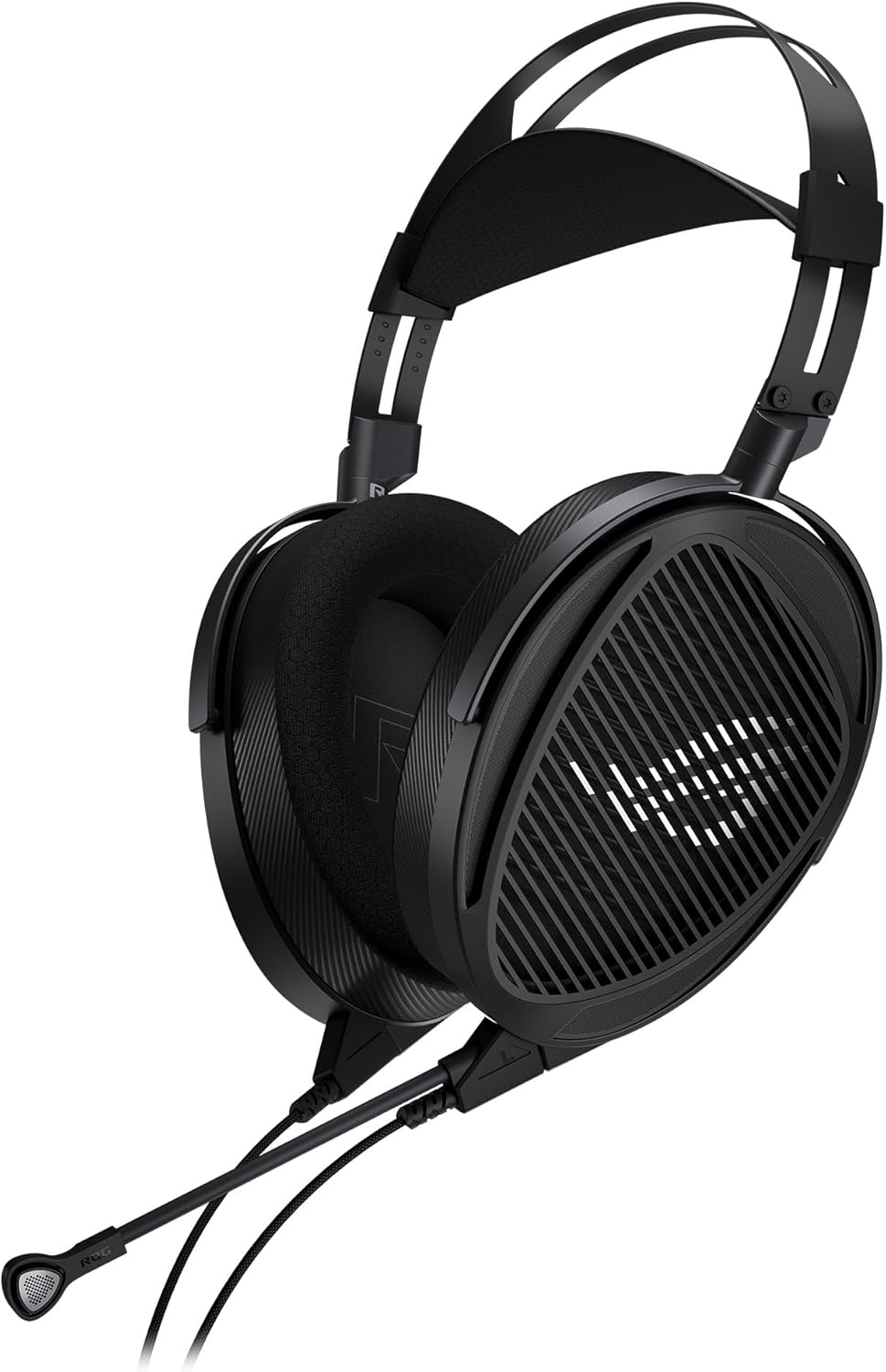
ASUS ROG Kithara Hifiman Gaming/Audiophile Open Wired Headphones withBest Open-Back Audiophile Pick
|
8.4 / 10 | Check Price → |

Sony ZX Series Wired On-Ear HeadphonesBest Lightweight Travel Pick
|
9.0 / 10 | Check Price → |

OneOdio A70 Bluetooth Over-Ear HeadphonesBest Dual Mode Pick
|
8.8 / 10 | Check Price → |
How We Chose the Best Wired Headphones For Coding
This is a research based guide, not a lab comparison. Each pick was chosen by reading listing details, specifications, features and how well the design fits long coding sessions. We looked at isolation, comfort, cable and plug type, microphone options and how simple each pair is to set up on a laptop or desktop. Only wired or wired capable models made the list.
We did not measure sound ourselves, so we describe what the listings claim and what common headphone technology means in practice. Each pick also has an editorial score out of 10, shown separately on the site. Treat the order as a guide to fit and features, and check the live listing for the latest details before you buy.
In-Depth Reviews
1Audio-Technica ATH-M50X Professional Studio Monitor Headphones

The Audio-Technica ATH-M50X takes the top spot because it balances the things programmers need most: clear sound, a closed design that shuts out a noisy room, and a build meant to last for years. The listing describes proprietary 45 millimeter drivers with rare earth magnets and copper clad aluminum wire voice coils. That is a larger driver than most pairs on this list, and it points to a studio monitor tuning rather than a bass heavy consumer sound.
Clarity across an extended frequency range is the main promise here, along with deep and accurate bass. For coding, that means a podcast, a lo-fi playlist or a conference talk should stay easy to follow without the music turning into a wall of low notes. The circumaural shape sits around the ears instead of on them, which gives sound isolation in loud places. The earcups also swivel 90 degrees, so you can slide one cup off to talk to a teammate and keep listening with the other.
This model suits developers who work in open offices, shared flats, libraries or coworking spaces and want a pair that handles an eight hour day. It also fits anyone who splits time between writing code and editing video, recording a screencast or mixing audio, since the headphones were designed for studio tracking and monitoring. Students who want one pair for lectures, music and late night debugging sessions will find it flexible, as long as they are happy with a wired connection.
A few practical points are worth knowing. The cable is detachable, so a frayed lead can be swapped without replacing the whole headset, though you should check which cable length and plug type ships with your version. Studio headphones usually have no built in microphone, so plan on a separate mic for stand ups and calls. Closed designs can feel warm over long sessions, so take short breaks, and keep the volume moderate so your ears stay comfortable.
Large 45 mm drivers with clear detail
Detachable cable is easy to replace
Closed design isolates office noise
Swiveling cups allow one ear monitoring
No microphone for calls
Studio fit can feel warm over hours
2Sennheiser HD 280 Pro Closed-Back Studio and Live Monitoring
Sennheiser built the HD 280 Pro for studio and live monitoring, and that background suits programmers who need to disappear into a problem. The listing promises up to 32 dB of attenuation of outside sound from a closed ear design. That is one of the most specific isolation claims in the whole data set, which is why this pair earns the noise isolation award. Keyboard chatter, a loud kitchen or a passing train become much less distracting when the earcups seal properly.
The design is dynamic and closed, with an around the ear shape and padded earcups. The sound is described as warm and natural with extended frequency response, a tuning that tends to feel relaxed rather than sharp. For long coding sessions that matters, because a gentle balance causes less listening fatigue than a bright, treble heavy sound. The cord is coiled and listed at 3.3 to 9.8 feet, so it stretches to a standing desk but stays tidy when you sit close to the computer.
Think of this as the pick for open plan offices, busy dorms and home setups where other people are loud. It also works for developers who edit audio or run a podcast on the side, because monitoring headphones aim for honest sound instead of heavy colouring. Anyone who dislikes bulky gear should look at the on-ear options further down, since an around the ear closed design always carries a bit more size and weight. It is an easy choice for anyone who wants durable, serious gear.
Good news on longevity: the listing says the earpads, headband padding and audio cord are all easily replaceable, which keeps the pair useful for years. Be aware that the connection is wired only and there is no inline microphone listed, so video calls need a separate mic. A tight seal also blocks the sound of someone walking up to your desk, so stay aware of your surroundings. Keep the volume at a safe level, especially when the isolation tempts you to turn it up.
Up to 32 dB attenuation listed
Warm and natural tuning
Pads, headband padding and cord replaceable
Lightweight ergonomic design
No microphone listed
Coiled cord can tug on a small desk
3Logitech H390 Wired Headset PC/Laptop Stereo Headphones
Not every programmer works alone, and the Logitech H390 is the pick for people whose day includes stand ups, pair programming calls and client meetings. It connects through a USB-A plug, so the computer handles the audio and there is no need for a headphone jack. The listing says it is plug and play with no software to install, which suits locked down work laptops where installing drivers is not allowed. For remote teams, that simple setup removes one more thing to configure before a meeting starts.
The standout feature is the rotating boom microphone with noise canceling that minimizes unwanted background noise. When you are not talking, the arm can be tucked out of the way. Simple in-line controls on the cable let you change the volume or mute a call without hunting through menus, a small thing that saves real time during a meeting. The drivers are described as fine tuned for digital stereo sound across music, calls and meetings.
This headset fits remote developers, bootcamp students, support engineers and anyone who joins video calls daily. The cable is listed at 6.23 feet (1.9 m), long enough to stand up and stretch during a long conversation. Swivel mounted leatherette ear cushions and an adjustable headband are meant for hours of wear, and the listing says the cushions are easy to clean, which helps in a shared workspace. Because the headset is built around calls and general listening, it also works well for online classes and webinars.
Keep a few limits in mind. Music fans who want studio level detail will probably prefer the monitor style models in this guide, because this one is aimed at speech and everyday listening. The USB-A connection also means it will not plug into a phone or tablet without an adapter. Leatherette can warm up the ears in summer, so consider short breaks, and watch the volume on loud calls to keep listening comfortable. Wiping the cushions every so often keeps the leatherette looking fresh and feeling clean.
Plug and play with no software
Rotating mic tucks away
Easy mute and volume controls
Long 1.9 m cable
USB-A only, needs adapter for phones
Aimed at voice more than music detail
4Sony MDR7506 Professional Large Diaphragm Headphone
Few headphones are as familiar in recording studios as the Sony MDR7506, and the listing explains why: neodymium magnets with 40 millimeter drivers, a closed ear design and rugged construction. This guide ranks it as the best foldable studio pick because it brings a professional heritage to a desk without taking much room when packed away. Programmers who want honest, detailed sound for music and spoken audio will find a lot to like.
The closed ear design is described as giving outstanding reduction of external noise, which helps with focus in a lively room. Frequency response is listed as 10 hertz to 20 kilohertz, a wide span for a pair at this size. The 9.8 foot cord ends in a gold plated plug, and a 1/4 inch adapter is included, which is handy if you also plug into audio interfaces or amps. The cord is not detachable, so treat it gently.
This pair suits developers who also dabble in sound design, game audio or podcast editing, and anyone who carries headphones between home, campus and a coworking desk. The fold up body and the provided soft case make it easy to slip into a backpack beside a laptop. Because it is built as a monitor, it tends to reward clean source files, so streaming at decent quality helps you hear its strengths. Its straightforward, honest sound also makes it a handy reference pair for checking how a mix or a video sounds.
Some caveats apply. With a fixed cable, a worn lead means a repair job rather than a quick swap, and the long cord can snag on chairs at a crowded desk. There is no microphone, so meetings call for another device. Studio style fit may feel snug on larger heads over a full day. As with any closed pair, keep volume reasonable and take breaks away from the screen to rest your ears.
Pro studio heritage and 40 mm drivers
Folds flat with soft case included
Wide 10 Hz to 20 kHz response listed
1/4 inch adapter included
Cable is not detachable
No microphone for calls
5Audio-Technica ATH-M20x Professional Studio Monitor Headphones
The Audio-Technica ATH-M20x is the more affordable way into studio monitor sound on this list, which makes it a strong value choice for students and junior developers. It is built for tracking and mixing, and the listing highlights advanced build quality and engineering. You get 40 millimeter drivers with rare earth magnets and copper clad aluminum wire voice coils, a spec sheet that looks more expensive than the pair usually feels in the hand. For a first pair that still looks the part at a desk, it is an easy model to recommend.
Tuning is described as enhanced low frequency performance, so expect a fuller bottom end for lo-fi beats, electronic playlists and film soundtracks. The circumaural design contours around the ears for sound isolation in loud environments, which helps in dorm rooms and shared offices. A single side cable exit keeps the lead on one side of your body, so it is less likely to tangle across a keyboard or catch on a mouse. The black finish is plain and professional, so it fits in an office as easily as in a bedroom.
This model fits learners building their first desk setup, bootcamp students who want one pair for music and tutorials, and hobbyists who record small projects after hours. Anyone who wants a no fuss, wired pair that will survive a backpack can start here. Developers who want a swappable cable or a more neutral sound might step up to the model ranked first in this guide. It is also a sensible spare for a second desk or a shared room.
Practical notes matter here. The listing does not mention a detachable cable or a built in microphone, so plan for a separate headset or desk mic for meetings and keep the lead away from sharp edges. Extra low end can sound strong at higher volume, so keep it moderate and check how it feels after an hour. Closed ear cups also hold in heat, so a short break every so often keeps things comfortable. Giving the pads a gentle wipe now and then helps them last.
Affordable studio monitor option
Fuller bass for lo-fi and electronic
Closed design blocks loud rooms
Single side cable exit
No microphone listed
Bass lift may colour some tracks
6JBL Tune 520C USB-C
Many new laptops, tablets and phones have dropped the headphone jack, and the JBL Tune 520C is made for that world. It is a wired on-ear model with a USB-C plug, so it connects straight to a modern laptop, phone, tablet or console. The listing says digital Hi-Res audio at 96kHz/24bit comes from a DSP chipset, which handles the conversion inside the headphones instead of relying on the device. That makes it a neat fit for compact coding setups.
Sound comes from a pair of 32mm dynamic drivers with JBL Pure Bass Sound, and the three-button remote adds a microphone for calls. The remote lets you control playback and volume and switch EQ presets without touching the computer. The default preset aims for a balanced sound, a Bass option adds energy at the low end, and a Vocal option lifts the midrange so voices and podcasts sound clear and bright. Switching presets takes a single press, which keeps you in the flow of your work.
This pair suits developers who code on a thin laptop, a tablet with a keyboard or a USB-C only workstation, and who also want to take calls from the same device. The vocal preset is useful for tutorials, language lessons and meetings, while the bass preset can liven up a playlist between tasks. Its on-ear shape tends to be lighter than a full around the ear monitor, which many people prefer for casual use.
The listing is for a USB-C pair, so older gear with only a round 3.5mm jack will need an adapter. Check that your computer’s USB-C port supports audio output, since a few ports are charge only. On-ear cups press on the ear instead of around it, so isolation will not match a big closed monitor and some people feel pressure after long hours. Keep volume sensible when switching to the bass preset.
USB-C connects to modern devices
Three EQ presets for music and voice
Remote with mic for calls
Lightweight on-ear shape
Needs a USB-C audio port
On-ear fit can press after long hours
7KVIDIO Wired Headphones with Mic
The KVIDIO wired headphones are a generic, no frills choice that leans on comfort and adjustability, which earns them the best adjustable fit award. The listing describes 40mm drivers with balanced audio, crisp highs and deep bass for music, calls, videos and podcasts. Over-ear cups provide passive noise isolation, so the headphones help dull distractions without any batteries or electronics to manage. In short, it targets people who want a comfortable, no pressure pair for everyday work.
A five-level adjustable headband is meant to give a secure fit across a wide range of head sizes without too much pressure. The cups use soft leather cushions, and the headband is padded as well. They fold compactly and the ear cups swivel 90 degrees, so they can rest around your neck during a break. The cable is nylon braided to resist tangles and ends in an L-shaped, gold-plated 3.5mm jack. Reinforced steel components are also mentioned for durability.
This pair is for students, junior developers and anyone building a simple desk kit with a laptop, tablet or phone. The built-in microphone and in-line controls handle quick calls, plays, pauses and skips. It also makes a sensible second pair to keep in a bag for classes or travel, since the folding design saves space. Modest expectations help: it is a school and everyday pair, not a studio reference. Parents buying for a student heading to class will find the foldable shape practical.
The listing carries an important warning that the in-line volume control is not supported on desktops and some laptops, so you will adjust volume on the computer instead. A device with no 3.5mm jack needs a conversion adapter. Because the product is a generic model, specifics beyond the listing are limited, so read the return terms before buying. Leather cushions can feel warm, so rest your ears now and then and keep volume moderate.
Five-level adjustable headband
Foldable with swiveling cups
Tangle-resistant braided cable
Built-in mic and controls
In-line volume may not work on desktops
Needs adapter without 3.5mm jack
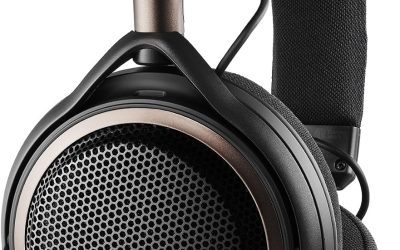
8ASUS ROG Kithara Hifiman Gaming/Audiophile Open Wired Headphones with
The ASUS ROG Kithara is the premium, adventurous entry here, built with HIFIMAN for gaming and audiophile listening. It uses 100mm planar magnetic drivers, a type that moves a thin, flat diaphragm instead of a small cone. The listing promises vivid detail across a wide frequency range with very low distortion. For coders who treat music as part of the craft, this is the pair that aims highest on sound. Its looks follow the ROG style, with signature design touches on the earcups.
An open-back design lets air and sound pass through the earcups, which creates a spacious, natural soundstage with clear separation between bass, mids and treble. It also means people nearby can hear what you play and you hear them, so it suits quiet rooms best. An on-cable MEMS boom microphone covers calls, with a listed 20Hz to 20kHz response. The metal frame and hinges, plus an eight-level adjustable headband, point to a build meant for daily use.
Choose this model if you work from a quiet home office and care about fidelity more than isolation. The included plug choices are generous: a 4.4mm balanced plug, 3.5mm and 6.3mm single-ended plugs, and a USB-C adapter. That makes it ready for DACs, amps, PCs, consoles and mobile devices. Gamers who code, and developers who enjoy detailed music during deep work, are the target here. It is a natural partner for a desktop with a dedicated DAC.
Be realistic about the trade-offs. Open-back headphones leak sound and let in room noise, so they are poor choices for open offices, trains or shared flats. Planar magnetic drivers often benefit from a capable amp or DAC, so check what your setup can drive and use the provided adapters sensibly. A larger size also means more weight on the head, so rest regularly and keep the volume at a safe level. A quick check of your source’s output type will save frustration on day one.
100 mm planar magnetic drivers
Open-back soundstage
Boom mic for calls
Many plug options included
Open-back leaks sound and lets noise in
May want an amp or DAC
9Sony ZX Series Wired On-Ear Headphones
The Sony ZX Series MDR-ZX110 is a small, light and simple wired on-ear pair, which makes it the lightweight travel pick for coders on the move. The listing describes 1.38 inch neodymium dynamic drivers with a dome type unit, aimed at a punchy, rhythmic response. Travel is named as a specific use, so this model is built for bags, buses and borrowed desks more than for a permanent studio. It is a modest pair that keeps things plain and portable.
The earcups swivel, which makes storage easy and keeps the pair portable. Cushioned earpads and a closed-back design seal in sound, and the listing gives a frequency range of 12 Hz to 22 kHz for deep bass, rich midrange and soaring highs. Impedance is listed at 24 ohm, a low figure that most laptops and phones can drive without trouble. The cord is 3.94 feet with an L-shaped 3.5mm stereo mini plug.
This suits students who code in cafes, commuters who review pull requests on the train and anyone who wants a backup pair for the office. The short cord is neat on a laptop in your lap, and the light build avoids neck strain. It is also a good gift pair for a newcomer who wants a plain headset for tutorials without extra settings or software. Anyone who values a compact kit will appreciate how little space it takes.
A short 3.94 foot cord limits how far you can lean from a desktop tower, so measure your setup first or add an extension cable. There is no microphone listed, so calls need another device. On-ear cups press on the ear, and isolation will be lighter than an around the ear studio pair, so very loud rooms may still leak in. Keep the volume low in public spaces to protect your hearing. If your bag is crowded, wrap the cord loosely to avoid stress on the plug.
Light and easy to carry
Swiveling cups for easy storage
Low 24 ohm impedance suits laptops
Closed back seals in sound
Short 3.94 ft cord
No microphone listed
10OneOdio A70 Bluetooth Over-Ear Headphones
The OneOdio A70 is the only model here that works both wired and wirelessly, so it earns the dual mode award. The listing describes it as a Bluetooth over-ear headphone with a wired mode too, using two included audio cables (3.5mm to 6.35mm and 3.5mm to 3.5mm). In wired mode it never runs out of power, a comfort for developers who hate a dead battery halfway through a release deadline. That flexibility is the reason it earns a place on a wired focused list.
Inside are 40mm neodymium drivers and an aluminum fascia, aimed at powerful bass and dynamic stereo sound. Wireless playtime is listed at up to 72 hours. A rotatable, foldable structure helps with fit and storage, and soft memory cotton with protein leather is meant for long wear. A built-in HD microphone with noise reduction handles calls, and the aux plug has a lock design for a stable connection. Together these details give it more features than most plain wired headsets.
This is a pick for people who want one pair for the desk and for walking around. At the desk, plug in for steady wired use. On a commute or while grabbing coffee, switch to Bluetooth. A music sharing feature lets a second pair connect so two people can play games or watch videos together, which helps for pair programming demos or study groups. It also suits anyone who moves between a desk and the sofa.
As the question is wired headphones for coding, remember that this pair is the most flexible but not the purest wired design. Wireless mode can add some delay in video and games, so use the cable when timing matters. It also has more parts than a simple wired headset, so charging habits matter. Keep volume moderate, and check how the over-ear cups feel after a few hours before committing. If you rely on wireless mode, charge it before a long day.
Wired and Bluetooth in one pair
Wired mode never needs charging
Share feature for two listeners
Built-in mic and locking aux jack
More complex than a plain wired pair
Wireless mode can lag behind video
How to Choose the Best Wired Headphones For Coding
Why wired headphones still make sense for coding
A cable removes three small annoyances that add up over a work week: pairing problems, dead batteries and audio lag. Plug the lead into the computer and sound just starts. There is nothing to charge overnight, nothing to update and nothing that drops out when you walk to the kitchen with a laptop in hand. That reliability is a big reason many developers keep a cable in the drawer even when they own wireless gear.
Wired audio also tends to be simple to troubleshoot. If something is silent, you check the plug, the port and the volume, and you are done in a minute. For a job that already involves plenty of debugging, a headset that never asks for attention is a quiet advantage, especially on long days with tight deadlines. It also means one less device to charge before an early morning meeting.
Closed back or open back for a programmer
Closed back cups seal the sides, which blocks outside noise and keeps your music from leaking into the room. That makes them the default choice for offices, dorms, trains and shared homes. They can feel warmer and a little less spacious in sound, but for focus the seal is usually worth it. If you work late, a sealed pair also keeps music from disturbing people sleeping nearby.
Open back cups let air and sound pass through, giving a wider, more natural soundstage. The cost is leakage in both directions, so coworkers hear your playlist and you hear their chatter. Use open designs only in a quiet private room, and keep a closed pair nearby for noisier days. Try swapping between both styles for a week if you can, because personal taste decides a lot here.
Comfort for eight hour sessions
Comfort decides whether you keep headphones on all afternoon. Look for padded earcups, a headband that adjusts without pinching and a weight that does not pull on your neck. Around the ear shapes spread pressure, while on-ear shapes press on the ear itself and can feel tight after a couple of hours. A pair you forget you are wearing is usually the pair that was chosen well.
Ear pad material also matters. Leatherette and protein leather are easy to wipe clean and seal well, though they can warm up in summer. Fabric pads breathe better but may let more sound through. Replaceable pads are a bonus, because worn cushions are the most common reason a good pair starts to feel bad. Pressure near the top of the ears is an early sign that a fit is not right for you.
Do you need a built in microphone
If you attend daily stand ups or pair on calls, a headset with a boom or in-line microphone saves you from buying extra gear. A rotating boom arm is easy to tuck away, and in-line controls make muting quick. Check where the mic sits, because some pickups sound better when close to the mouth. Headsets with a mic also tend to include handy mute controls on the cord or ear cup.
Studio monitors usually skip the microphone to keep the design focused on listening. That is fine if you already own a desk mic or use a laptop mic for rare calls. Decide how often you talk, then choose between a pure listening pair and a headset that handles both jobs. Pairing a studio pair with a small desk mic is a popular solution for people who care about both listening and voice quality.
Plug types: 3.5mm, 6.3mm, USB-A and USB-C
Most wired headphones use a 3.5mm plug, with a 6.3mm adapter for audio interfaces and amps. USB-A and USB-C models carry a small digital converter inside, so the computer sends digital audio and the headphones handle the conversion. That can help on laptops that have dropped the round jack. A loose looking adapter is not always the problem, but a loose one can cause crackles, so check the fit of every plug.
Before buying, count the ports on your computer. If your laptop has only USB-C, a USB-C headset or a small adapter is the simplest route. If you use a desktop with a front jack, a 3.5mm pair is easier. Keep an adapter in the bag for flexibility between machines. Always confirm the port on your own computer before ordering, since the plug is the first thing that must match.
Impedance, drivers and what the numbers mean
Impedance, measured in ohms, shows how hard a headphone is to drive. Low values around 24 to 32 ohms work happily from laptops and phones. Higher values may need a stronger source to reach full volume. Driver size, such as 40 mm or 45 mm, hints at how large the sound producing element is, but tuning matters more than size alone. Listing details such as these help explain why two pairs with similar prices can feel so different at the desk.
Planar magnetic drivers are a different design that uses a flat diaphragm, often praised for low distortion and fast response. They can ask more from the source, so pair them with a capable amp or DAC. For ordinary coding playlists, a standard dynamic driver is perfectly good. For most home office setups, standard dynamic drivers already offer more detail than a laptop speaker ever could.
Sound that helps you stay focused
Sound for coding should be easy to forget. A neutral or warm tuning is easier on the ears than a sharp, bright one, and too much bass can mask speech in a podcast or tutorial. Many programmers prefer instrumental tracks, ambient playlists or white noise to avoid lyrics that compete with thinking. Instrumental music, rain sounds or quiet electronic tracks are common choices when the task needs full attention.
EQ presets or a simple tone choice can help too. A vocal setting lifts voices for lectures and calls, while a bass setting suits upbeat work. Keep the volume moderate. Loud listening does not improve focus, and your ears will thank you after a long day. Very high volume also hides small sounds in a mix, so a moderate level actually helps you hear detail.
Cable length, detachable leads and durability
Cable length shapes how you sit. A cord near four feet is tidy for a laptop but short for a tower under the desk, while a cord near ten feet reaches almost anywhere but can snag on chairs. A coiled cord stretches when needed and shortens when not. The shape of the cord matters too, as a coiled lead can pull on a small desk while a straight one lies flat.
A detachable cable is a real durability win, because the lead is the part most likely to fail. If the cable is fixed, treat it gently, avoid sharp bends and do not wrap it tightly around the headphones. Replaceable pads and headband padding also add years to a good pair. Spare cables are inexpensive compared with a full pair of headphones, which is why detachable designs are popular with studio users.
Isolation and staying aware of your surroundings
Strong isolation helps you focus, but it also hides sounds you may need, such as a colleague calling your name, a delivery or an alarm. If you work in a shared home, consider taking one cup off or using headphones with swiveling cups for quick one ear listening. A seal that is too strong can leave a room feeling oddly quiet, which some people find tiring.
On-ear and lighter designs let in more room sound, which some people like for awareness. Pick the level of isolation that fits your space. A calm home office can use lighter isolation, while an open plan office or a long train ride usually benefits from a tight seal. Swiveling earcups give you a quick option when you only need to hear one thing at a time.
Safe listening habits for long days
Long sessions make it easy to creep the volume upward. A good habit is to set the level so you can still hear a quiet conversation around you, then leave it there. Closed headphones in noisy places tempt people to turn things up, so use isolation instead of volume to beat the noise. A short walk and a glass of water every hour does more for your focus than any gadget.
Take short breaks away from the screen and remove the headphones now and then. Clean ear pads regularly, because sweat and dust build up over weeks. If anything feels uncomfortable, lower the volume or switch to a lighter pair, and consider speaking to a professional if you have concerns. Cleaning wipes and the occasional pad replacement keep a good pair feeling new for much longer.
How to choose between the ten picks
Start with your space. For noisy offices, look at the closed studio models and the one with the strongest listed isolation. For quiet rooms and music focus, the open-back model offers the widest sound. For calls, the USB headset with a rotating microphone is the most direct answer. Weigh each of these points against how you actually work, and the right pair usually becomes clear.
Then think about your device. A USB-C laptop favors the USB-C model, while a desktop with a 3.5mm jack opens up almost every pair. If you travel, look at light, foldable designs. If you want a backup, a basic lightweight pair is plenty and takes no setup. If a few models still look equal, choose the one with the simpler setup and the more comfortable fit.
Frequently Asked Questions
What are the best wired headphones for coding overall?
Our top pick is the Audio-Technica ATH-M50X. It pairs 45 millimeter drivers with a closed design, a detachable cable and swiveling cups. It suits long sessions, noisy rooms and developers who also edit audio or video.
Are wired headphones better than wireless for programming?
Neither is better for everyone. Wired pairs avoid charging, pairing and delay, which many developers value. Wireless pairs offer freedom of movement. If you sit at a desk most of the day, a wired pair is simple and reliable.
Do I need a microphone on my coding headphones?
Only if you take regular calls. A headset such as the Logitech H390 includes a rotating boom mic and simple controls. If you rarely talk, a studio style pair with no mic is fine and you can use a separate desk mic.
Are open-back headphones good for coding?
They can be, in a quiet private room. Open-back designs give a wide, natural soundstage but leak sound and let room noise in. In an office or shared home, a closed back pair is the safer choice.
Which headphones work with a USB-C only laptop?
The JBL Tune 520C USB-C plugs straight into a USB-C port and includes a remote with a microphone. Other 3.5mm pairs can work through a small adapter, so check your laptop’s port supports audio before buying.
How loud should I listen during long coding sessions?
Keep the level low enough that you can still hear a quiet conversation nearby. Use closed headphones to block noise rather than raising the volume. Take regular breaks, and lower the volume if anything feels uncomfortable.
What does impedance mean for laptops and phones?
Impedance in ohms shows how hard a headphone is to drive. Pairs listed at 24 or 32 ohms are easy for laptops and phones. Higher numbers may need a stronger source or amp to sound their best.
Is a detachable cable worth paying for?
Yes, if you want a pair to last. The cable is the part that often fails first, and a detachable one can be swapped in minutes. Fixed cables need careful handling, so avoid sharp bends and tight wrapping.
What is the most affordable pick in this guide?
The Audio-Technica ATH-M20x is the value studio choice, and the KVIDIO model is a simple option for light use. We do not quote prices because they change, so check the live listings for current offers.
Can I use studio monitor headphones for gaming and music?
Yes. Studio monitors are built for honest sound, which works well for music, films and many games. Remember that most have no microphone, so voice chat needs a separate mic or a headset with one built in.
The Bottom Line
The best wired headphones for coding depend on your space, your device and how often you talk. For most developers, the Audio-Technica ATH-M50X is the safest all round choice, with clear studio sound, a closed design and a detachable cable.
If noise is your main problem, look at the Sennheiser HD 280 Pro. If calls fill your day, the Logitech H390 is the easy answer. Check the live listings for current offers, and keep the volume comfortable.
Updated for the 2027 buying season. Amazon listings and availability change often, so check the product page for current details.
Write Your Review
No reviews yet. Be the first to share your experience!