

As an Amazon Associate we earn from qualifying purchases. If you buy through links on this page we may receive a commission at no extra cost to you. Product details come from Amazon listings and can change.
Choosing the best usb microphones comes down to a few practical questions. How many voices will you record, how quiet is your room, and do you want simple plug and play or a mic with software and effects? A USB mic has its own converter built in, so it connects straight to a computer without an audio interface. This guide compares ten of them using the details published in each product listing.
It is written for streamers, podcasters, students, remote workers, musicians and anyone upgrading from a laptop or headset mic. Some picks offer several pickup patterns, some add dials and onboard processing, and some keep things small and affordable. Each product gets four short sections covering what it is, how its features work, who it suits and what to watch for.
Prices change often and sales come and go, so we do not print any. Every product links to its live listing, where you can check the current offer, bundle contents and delivery. After the picks, a buying guide explains pickup patterns, condenser versus dynamic capsules, monitoring, gain and placement in plain language.
Our top pick is the Logitech Creators Blue Yeti, which offers a three-capsule array, four pickup patterns and onboard controls for most creators. The Elgato Wave:3 MK.2 suits streamers who want clipping protection and effects, while the RODE NT-USB Mini is the compact choice for a small desk.
Key Takeaways
Best Usb Microphones at a Glance
| Product | Our score | |
|---|---|---|
| 9.2 / 10 | Check Price → | |

Elgato Wave:3 MK.2 USB Condenser MicrophoneBest for Streamers
|
9.4 / 10 | Check Price → |

Shure MV6 USB Microphone for GamingBest for Beginners
|
9.0 / 10 | Check Price → |

RØDE NT-USB+ Professional-Grade USB Condenser Microphone For RecordingBest for Home Studios
|
9.0 / 10 | Check Price → |

RØDE NT-USB Mini Studio-Quality USB Condenser MicrophoneBest Compact Mic
|
9.0 / 10 | Check Price → |

SENNHEISER Professional ProfileBest for Natural Voice
|
9.0 / 10 | Check Price → |
RØDE PodMic USB Dynamic Broadcast MicrophoneBest for Noisy Rooms
|
8.6 / 10 | Check Price → |

TONOR Podcast MicrophoneBest Value Kit
|
8.6 / 10 | Check Price → |

ZealSound Podcast Microphone for PCBest for Podcast Controls
|
8.8 / 10 | Check Price → |

Amazon Basics Condenser Microphone for PCBest Budget Friendly Pick
|
8.8 / 10 | Check Price → |
How We Chose the Best Usb Microphones
This is a research based guide, not a lab comparison. We read each product listing closely, noting the capsule type, pickup pattern, connection, controls, included accessories and the use cases the maker highlights. We then matched those details against common jobs such as streaming, podcasting, video calls, voice over and basic music recording, and ranked each mic by how well its published features fit those jobs.
We also used general microphone knowledge to explain what each feature means in practice, such as cardioid pickup, gain control and zero-latency monitoring. Where a listing does not give a detail, we say so rather than guess. Every pick carries an editorial score out of 10 on the site, shown separately from the text, which reflects feature fit, flexibility and value for its intended buyer.
In-Depth Reviews
1Logitech Creators Blue Yeti USB Microphone for PC

The Logitech Creators Blue Yeti earns the top spot because it covers the widest range of jobs in a single plug and play body. The listing describes a custom three-capsule array aimed at YouTube videos, game streaming, podcasting, meetings and music recording. That flexibility matters for shoppers who do not yet know which hobby will stick, since one mic can follow them from Discord chats to a first podcast episode. That mix of breadth and simplicity is what keeps this model in so many creator setups, and it gives first time buyers room to grow into the extras.
Four pickup patterns sit at the heart of the design: cardioid, omni, bidirectional and stereo. Cardioid favors a single voice in front of the mic, bidirectional suits a two person interview across a table, omni captures a room, and stereo gives a wider image for instruments. Onboard controls handle headphone volume, pattern selection, instant mute and mic gain, and Blue VO!CE software adds vocal effects and modulation on top. Because every control sits on the body, you can change a setting mid session without hunting through menus or pausing the recording.
This model suits solo streamers, podcast hosts with a guest, students recording lectures and musicians sketching ideas at home. Because the capsules are sensitive, it works best in a quiet room with the mic pointed toward your mouth. The listing mentions a pivoting desktop stand, and you can also attach it to a boom arm or mic stand, which helps keep keyboard noise away from the capsules. Podcast pairs can also share it by switching to the bidirectional pattern and sitting on opposite sides, which saves buying a second mic.
A few practical points are worth knowing before you buy. Choose the pattern that matches your setup, because leaving it on stereo or omni in a noisy room invites background sound. Use the gain dial conservatively so loud moments do not distort. The listing highlights no latency monitoring, so plug in closed headphones and keep the volume at a comfortable level to avoid fatigue. Treat the pattern knob as the first thing to check whenever the sound seems odd, since a wrong setting explains most surprises.
Four pickup patterns for varied setups
Onboard gain, mute and headphone volume
Software effects through Blue VO!CE
Works on both Mac and PC
Sensitive capsules reveal a noisy room
Larger body than compact desk mics
2Elgato Wave:3 MK.2 USB Condenser Microphone
The Elgato Wave:3 MK.2 is a streamer focused USB condenser that pairs a cardioid capsule with a lot of on-device help. The listing calls out a premium condenser capsule and USB-C connection, so it plugs into a PC or Mac and works right away. It lands high on this list because it tries to solve the most common live broadcast problem, which is a voice that suddenly clips when excitement rises. For people who already like tuning audio like a mixing desk, that blend of hardware and software will feel natural right away.
Its Clipguard 2.0 system is described as multi-stage protection that makes clipping virtually impossible, while Auto Gain sets levels in seconds. Onboard effects include a voice enhancer, a compressor and EQ, and the Wave FX Processor combines DSP effects with VST plugins in one chain. A multifunction dial and tap-to-mute control give quick adjustments, and LED feedback shows levels and status at a glance. In plain terms, anti-distortion tools act like a safety net, quietly lowering level spikes so a shout does not ruin a clip.
This mic suits streamers, gamers who talk loudly, video creators and anyone who likes tuning their sound through software. The Wave Link app handles routing and monitoring, so game audio, chat and music can be balanced as separate channels. The integrated headphone jack lets you hear yourself directly, which helps when you are tweaking effects while live and want to know exactly how your voice sounds. Content creators who edit video will also like having a polished voice from the start, since it can shorten cleanup time later.
Keep in mind that the app is part of the experience, so people who prefer a pure plug and play device with no software may use only a fraction of the features. Cardioid mics still pick up nearby sounds, so position the capsule close to your mouth and away from fans. Start with moderate effects, since heavy compression can make speech sound tiring over long sessions. Reading through the app options before a big broadcast is wise, so you know which effects you want active and which stay off.
Clipguard 2.0 protects against distortion
Auto Gain speeds up level setup
Built-in voice enhancer, compressor and EQ
Headphone jack with direct monitoring
Best features need the Wave Link app
More controls than a casual user needs
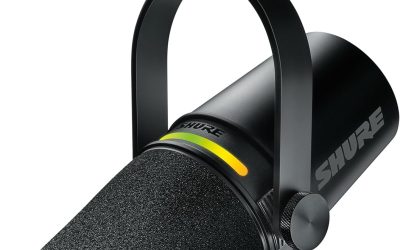
3Shure MV6 USB Microphone for Gaming
The Shure MV6 USB Microphone, listed as Gen 2, is pitched at first time streamers and creators who want professional audio without a steep learning curve. The listing says you simply plug in and start, and it ships with a desktop stand and a USB-C cable. That ready to go package is the main reason it takes the beginner award, since nothing extra is needed to begin recording. It is a thoughtful starting point for anyone who feels nervous about audio jargon and simply wants a clear voice from day one.
Voice Isolation Technology is described as capturing your voice clearly, while an adjustable real-time denoiser reduces distracting room noise. A Digital Popper Stopper reduces harsh plosives, the bursts of air that come with hard P and B sounds. The MOTIV Mix feature connects to Shure MOTIV desktop and mobile apps for extra control, so users can shape the sound further once they feel comfortable. Think of the denoiser as a dial rather than a switch, so you can strike a balance between a quiet background and a natural sound.
This mic fits newcomers upgrading from a headset mic or laptop microphone, as well as remote workers and students who want a clearer voice on calls. Streamers who share a room with a fan, a computer tower or a window will appreciate the denoiser. Because the processing is aimed at speech, it is a sensible choice for chat, narration and talk content rather than for recording full bands. Gamers who talk to teammates for hours may find that kind of steady, focused voice pickup easier on everyone listening.
Before buying, remember that any noise reduction system can slightly change how a voice sounds, so adjust the denoiser until speech still feels natural. Place the mic a hand or two away from your mouth for the best balance. The listing does not list pickup pattern switching, so shoppers who need to record two people on one mic may prefer a more flexible model. A short trial recording with the apps open, played back through headphones, is the quickest way to find a setting you like.
Built for first time creators
Voice isolation and adjustable denoiser
Digital popper stopper for plosives
Stand and USB-C cable in the box
Tuned for speech more than music
Extra control needs the MOTIV apps
4RØDE NT-USB+ Professional-Grade USB Condenser Microphone For Recording
The RODE NT-USB+ is a professional grade USB condenser aimed at recording rather than casual chat. The listing highlights a studio-grade condenser capsule and premium components, and it stands out for what sits behind the capsule. This is the pick for people who want a home studio sound from a single cable and who are happy to spend time shaping it. Think of it as the step up for creators who have outgrown starter mics and want more headroom and finer control.
An ultra-low-noise, high-gain Revolution Preamp is described as keeping the signal clean, which matters when recording quiet vocals or acoustic instruments. APHEX audio processing is available through RODE Central software, including the Aural Exciter and Big Bottom processors that add brightness and low end weight. A high-power headphone output with zero-latency monitoring and versatile controls lets you hear yourself clearly while recording or streaming. In everyday use, a clean preamp means you can keep gain moderate and still capture soft passages, with less hiss in the background.
It suits singers, voice over artists, podcasters and music producers who record directly into a computer. Because it is a condenser, it captures fine detail, so a treated or at least soft furnished room makes a real difference. The headphone output is described as high power, which helps in loud environments, though it also means you should check volume levels before putting headphones on. Producers who want one mic for demos, narration and live streaming will find that the same device covers all three jobs.
On the practical side, the extra processing is optional, so beginners can leave it off and still get a clean recording. Use a pop filter or good mic technique for strong vocals, and mount it on a boom arm or stand for stability. Condenser sensitivity also picks up keyboard and mouse sounds, so keep the desk tidy and consider a shock mount. Taking a few minutes to explore the software processing pays off, because small changes can shape tone without extra plugins.
Low-noise high-gain preamp
APHEX processing through RODE Central
High-power headphone output
Zero-latency monitoring
More than casual chat users need
Condenser capsule reveals room noise
5RØDE NT-USB Mini Studio-Quality USB Condenser Microphone
The RODE NT-USB Mini is a small studio style USB condenser built for desks where space is limited. The listing describes a condenser capsule with a built-in pop filter, tuned for voice, calls and streams, and a setup that takes under a minute. It earns the compact award because it keeps the controls and extras that matter without taking over the desk. That focus on size makes it a sensible match for dorm desks, shared offices and laptop bags alike.
It connects straight to a Mac, PC or iPad over USB with no interface or drivers needed. Zero-latency headphone monitoring comes with a hardware volume control on the mic itself, so you can hear your voice without delay. The magnetic desk stand detaches instantly, and the mic then mounts on any arm that uses the standard thread, which keeps the cable and base off your workspace. In practice, having the monitor volume right on the body means you never need to open a menu mid conversation.
This model fits laptop users, students, remote workers and small time streamers who want clean voice quality in a small package. Its tuning for speech makes it a natural match for video calls, voiceovers and gaming chat. Because the listing includes a stand and a USB-C cable, the box has what you need, though a boom arm is a worthwhile upgrade for tight desks. Creators who record on the move can also pair it with an iPad, which makes quick voice notes and interviews simple.
A few points deserve attention. Compact condensers still pick up nearby sounds, so keep the mic close to your mouth and away from speakers to avoid echo. The built-in pop filter helps with plosives, but speaking slightly off axis also helps. If you want multiple pickup patterns or heavy software effects, a bigger model will give more room to experiment. A small mic stand or arm clipped to the desk edge keeps the cable tidy and lets you sit comfortably while you speak.
Small footprint for tight desks
Built-in pop filter
Detachable magnetic stand
Works with Mac, PC and iPad
Fewer onboard controls than larger mics
No pickup pattern switching listed
6SENNHEISER Professional Profile
The Sennheiser Professional Profile is a USB cardioid condenser designed to simplify podcast and streaming setups. The listing describes one simple connection, a table stand and a 1.2 m USB-C cable in the package. It earns the natural voice award because the maker says it delivers a warm, natural sound that accentuates the body and presence of the human voice. It suits people who prefer a calm, no nonsense workflow where the mic feels more like a tool than a project.
The capsule is described as an award-winning, German-engineered cardioid condenser design inside a metal housing. Controls include a mute button, a built-in headphone jack, gain, mix and volume control, which suggests a hardware first approach where you adjust sound by turning a dial rather than opening an app. The mix control lets you balance live mic sound against computer audio in your headphones. Using physical dials means you can make quick changes by feel, which is a relief during a live conversation.
This mic suits podcasters, interviewers, streamers and professionals who record narration or calls and want a polished voice with little fuss. The listing says it works for beginners and seasoned pros who want to simplify a setup. The table stand gives compact convenience, although better isolation from desk bumps usually comes from moving the mic to a boom arm. Teams producing weekly shows will like that its sound character stays steady, so episodes sound consistent from one recording to the next.
Before ordering, note that the listing focuses on voice and does not list switchable pickup patterns, so it is a single voice tool first. Cardioid capsules respond to distance, so stay close and keep a steady position for even levels. Listen at moderate volume through the headphone jack, and set gain so the loudest words stay clear of the red zone. Leave a little headroom in your levels rather than pushing the dial high, so unexpected laughs or raised voices stay clean.
Warm and natural voice character
Hardware dials for gain, mix and volume
Metal housing with table stand
USB-C cable included
Single cardioid pattern
Voice focused rather than multi-purpose
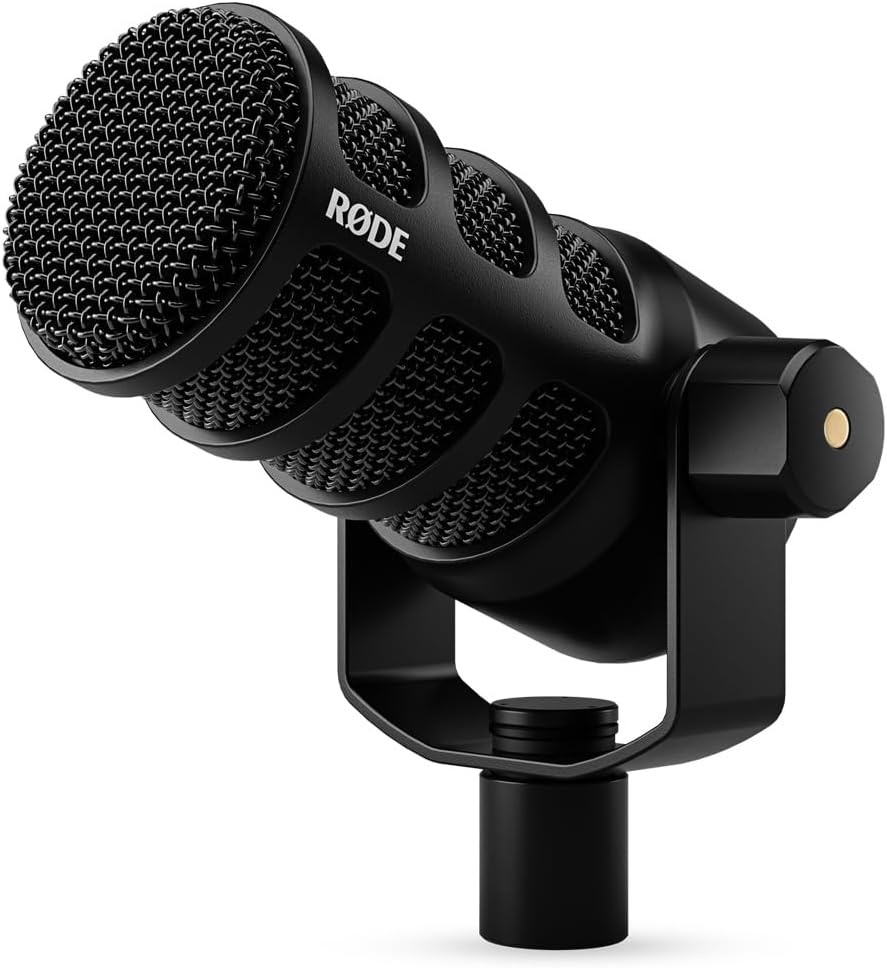
7RØDE PodMic USB Dynamic Broadcast Microphone
The RODE PodMic USB is a dynamic broadcast microphone with two ways to connect, which makes it the most future proof pick here. The listing describes both XLR and USB-C built in, so you can plug into an interface later or go straight into a laptop today. Dynamic capsules usually work well for speech in untreated rooms, which is why this model wins the noisy room award. Its dual connection design makes it a sensible long term buy for creators whose setups tend to evolve over time.
Onboard APHEX DSP adds compression and presence over USB, and you can dial it in with the free app. The capsule is described as made for speech, rejecting keyboard clatter and room echo on streams and podcasts. A headphone jack on the mic provides zero-latency monitoring so you hear your voice with no delay, which helps you judge your own tone while you talk. Because the capsule hears less of the room, people with hard walls or a nearby window often find it easier to live with.
It suits podcasters, streamers, radio style hosts and anyone recording in a bedroom or home office that is not acoustically treated. The package includes a swing mount, a USB-C cable and a pouch, and the mic works on Mac, PC, iPad and Android. Moving up to XLR later means your mic can stay even as your setup grows into a mixer or interface. Hosts who plan to add a mixer or a second mic later can keep using this one without replacing it.
As with most dynamic broadcast mics, you need to speak fairly close to the capsule for a full sound, so a boom arm helps hold the right position. Dynamic capsules usually capture less fine detail in the high end than condensers, which many speakers see as a plus. Check gain levels and listen at a moderate headphone volume while setting up. Many speakers find that a slightly raised gain and a steady, close position give the fuller, radio style sound they want.
XLR and USB-C in one microphone
Dynamic capsule reduces room echo
Onboard APHEX DSP
Swing mount and pouch included
Needs close speaking distance
Less suited to ambient or stereo recording
8TONOR Podcast Microphone
The TONOR Podcast Microphone, model TC-777, is a USB cardioid condenser built around the idea that a few add-ons make a big difference. The listing mentions a non-slip stand, a shock mount and a pop filter, all included with the mic. That accessory bundle is why it earns the value kit award, as many entry level mics leave those extras to a separate purchase. For anyone setting up a first desk, receiving the support gear in the same box removes a lot of guesswork.
Its cardioid pickup pattern is described as capturing clear voice in front of the mic while suppressing unwanted background noise. The listing adds one-click mute and volume control for easy operation during recording. The shock mount and pop filter are meant to prevent recordings from being disturbed by vibration and plosive sounds, and both the mic and the pop filter angle can be adjusted as needed. Put simply, the shock mount isolates the capsule from small bumps, and the pop filter softens sudden bursts of air from speech.
This mic suits students, remote workers, new podcasters and casual streamers who want a complete desktop setup in one box. The listing says it works on Windows, Mac, PS4 and PS5, and that Zoom, Skype and Discord recognize it quickly. It uses a USB 2.0 data port with no extra drivers or assembly, so it is friendly to people who do not like tinkering. Parents and teachers setting up a home study corner will find the quick mute and simple controls easy for everyone to use.
Keep expectations realistic for an affordable condenser. Capsules in this class pick up desk bumps and room reflections, so soft furnishings and a steady stand placement help. Do not expect the processing and software that premium models include. Set the pop filter a couple of fingers from the capsule, and adjust volume on the mic rather than turning up gain too aggressively. A thicker desk mat under the stand can further reduce rumbles from typing or table taps.
Shock mount and pop filter included
Cardioid pattern focuses on your voice
Works with Windows, Mac, PS4 and PS5
No drivers needed
No software processing listed
Entry level build compared with premium mics
9ZealSound Podcast Microphone for PC
The ZealSound Podcast Microphone, listed as the K66, is a USB condenser with a surprising number of physical controls for the category. The listing describes a high-performance condenser capsule and cardioid pickup pattern that focuses on your voice. It lands on this list because the front panel gives creators direct access to the settings they adjust most while recording or streaming. That range of controls on the outside is a practical advantage for people who dislike changing settings inside software.
Dedicated knobs handle microphone volume, monitoring volume and echo, so you can balance your voice and headphone level without software. A Noise Reduction Mode is switched on by pressing and holding the mute button, which lights a blue indicator. The listing also describes zero-latency monitoring through a 3.5mm headphone jack, plus an instant mute button with a red LED so you always know whether you are live. In simple terms, the monitoring knob changes only what you hear in your headphones, while the mic volume knob changes what gets recorded.
This mic suits phone based creators, podcasters, streamers and online teachers because the listing mentions included USB-C and Lightning connections for tablets and phones, as well as use on Windows, Mac, laptops and PlayStation consoles. It needs no drivers, apps or software installation. That makes it a friendly pick for shared computers or classrooms where installing programs is not allowed. It also fits families sharing one device across homework, gaming and calls, since the controls are obvious to anyone who picks it up.
As always with built-in noise reduction, results depend on your room and technique, so try it on and off and compare the playback. Use the echo knob lightly, since too much can make speech sound distant. Check which cable fits your device before connecting, and keep headphone volume moderate while you work out the best level. Start with every knob at a middle position, speak normally, and make small changes one at a time until it sounds balanced.
Dedicated knobs for volume, monitoring and echo
Noise Reduction Mode on the mute button
No drivers or apps required
Cables for USB-C and Lightning devices
Echo effect needs careful use
Brand is less established than major audio makers
10Amazon Basics Condenser Microphone for PC
The Amazon Basics Condenser Microphone is the simple, affordable entry on this list, built for people who want a straightforward USB mic with no learning curve. The listing describes a large 14mm diaphragm with high sensitivity, low noise and low distortion. It earns its place as the value pick because it covers the essentials of streaming, recording and podcasting without a long feature list. It is a sensible choice for anyone who values straightforward operation over a long list of features.
A cardioid pickup pattern is said to isolate background noise and keep sound clear for recording and broadcasting. The stand rotates 360 degrees for easy aiming, and a one-tap silent mode offers a built-in mute function that syncs with your laptop or PC. The listing also mentions a built-in shock absorber and a silicone rubber microphone boot, both of which help reduce bumps from the desk. In use, the rotating stand lets you tilt the capsule toward your mouth, which is often enough to improve clarity on its own.
This microphone suits students, remote workers, casual streamers and anyone moving up from a built-in laptop mic. The listing notes plug and play use with no additional drivers, and compatibility with Windows 7, XP, 8, 10 or higher and Mac OS 10.10 or higher. The microphone detaches and mounts on tripods, boom arms or stands that use a standard 5/8 inch thread. People who mostly attend video meetings or record occasional voice notes will find the simple design more than adequate.
Shoppers should keep in mind that the listing does not mention gain knobs, headphone monitoring or software, so it is a basic design by intention. Place it close to your mouth and away from speakers to keep sound clean. If you later want live monitoring or effects, a model with a headphone jack would be the next step up. A basic pop filter or a foam cover, if you add one, can give a further lift in speech clarity at very little extra cost.
Large 14mm diaphragm
Simple plug and play setup
Detaches for boom arm mounting
Shock absorber and silicone boot
No headphone monitoring listed
Fewer controls than premium mics
How to Choose the Best Usb Microphones
What a USB microphone is and why it is popular
A USB microphone packs a capsule, a preamp and an analog to digital converter into one body, then sends digital audio down a single cable. That means no audio interface and no phantom power, which is the main reason these mics have become the default for streamers, students and remote workers. You plug in, pick the mic in your software and start. Seeing the whole signal path in one unit helps beginners understand what each part does.
The trade off is flexibility. An XLR mic with an interface lets you upgrade each piece separately, while a USB mic is a complete unit. For most people who only need clean voice for calls, streams and podcasts, the all in one design is enough. A hybrid such as the PodMic USB shows how a model can offer both paths. Many people start with one and never need to switch to a full interface setup.
Condenser versus dynamic capsules
Condenser capsules are sensitive and detailed, which makes them popular for vocals, voice over and acoustic instruments in quiet rooms. Most USB mics on this list use one, including the Yeti, NT-USB Mini and Profile. Their sensitivity is a strength when the room is calm and a weakness when the room is loud or echoey. Matching the capsule type to your room is often the single best decision a buyer can make.
Dynamic capsules are less sensitive and usually reject distant sound better, which suits untreated bedrooms and busy offices. The PodMic USB is the dynamic option here and is described as made for speech. If your space has fans, traffic or reflective walls, a dynamic mic is often the easier route to clean audio. Listening to a short sample in your own space beats any theory, so record before you commit to a setup.
Understanding pickup patterns
A pickup pattern describes which directions a mic hears best. Cardioid favors the front and rejects the rear, which makes it the best default for one person speaking at a desk. Nearly every mic in this guide uses cardioid for that reason, and it explains why mouth position matters so much. Think about how many people will sit in front of the mic before paying for extra modes.
The Yeti adds omni, bidirectional and stereo options. Bidirectional picks up front and back, which suits a face to face interview. Omni hears all around and works for a group in one room. Stereo captures a wider image for instruments. Extra patterns are useful only if you have a real need for them. Switching patterns on the fly is handy, but a good default and steady placement matter more day to day.
Gain, monitoring and why they matter
Gain sets how strongly the mic signal is boosted before it reaches your software. Too low and your voice sounds thin and noisy, too high and loud words distort. Mics with a gain dial or Auto Gain, like the Profile and the Wave:3 MK.2, make this easier to manage because you can adjust without opening settings. A quick level check before every session is a habit that saves a lot of frustration later.
Zero-latency monitoring means you hear your voice through the mic’s own headphone jack with no delay from the computer. It helps you catch problems as they happen and keeps your voice feeling natural. Several mics here include it. Keep monitoring volume comfortable, because loud headphones for long sessions can tire your ears. Aim for peaks that stay comfortably below the loudest point, leaving space for sudden laughs or shouts.
Software, effects and processing
Some USB mics rely on software to shape the sound. Blue VO!CE on the Yeti, Wave Link on the Wave:3 MK.2, MOTIV Mix on the Shure MV6 and RODE Central on the NT-USB+ each give extra control. Features can include compression, EQ and denoising that tidy a voice before it reaches your audience. Many apps also offer presets, which are helpful starting points before you adjust anything yourself.
Software is optional for many people, and some models work fully without it. If you want to plug in and forget about settings, look for models with onboard dials or no-driver operation. If you enjoy tweaking, the apps open more options. Whatever you choose, aim for natural speech instead of heavy effects that fatigue listeners. A light touch with effects usually sounds more professional than a heavy one.
Placement and room tips for clean audio
Distance and position matter as much as the microphone. Most cardioid mics sound best a hand or two from your mouth, aimed slightly off axis to reduce plosives. Moving closer makes your voice stronger compared with room noise, but too close can sound boomy or push the gain into distortion. Small changes in distance often make a bigger difference than switching to a more expensive mic.
Room treatment need not be costly. Soft furniture, curtains, rugs and bookshelves all reduce reflections. Turn off fans and keep the mic away from the computer tower. Use a boom arm or the mic’s mount to separate it from keyboard bumps, and record a short sample to listen back before a long session. Even a quick sample recording will tell you whether echo or hum is the real issue.
Stands, arms and mounts
A desktop stand is the quickest way to start, but it carries vibrations from the desk straight into the capsule. A boom arm lifts the mic off the surface, lets you set the ideal distance and frees up space. Check the thread size, because several mics here mention standard mounting options such as 5/8 inch or the usual mic stand thread. Cable length and routing matter too, since a tidy layout reduces accidental knocks.
Shock mounts help with vibration and pop filters help with plosives. The TONOR TC-777 includes both in its listing, while the NT-USB Mini has a pop filter built in. If your mic lacks one, a small add-on pop filter is an inexpensive way to improve speech clarity without changing the mic. A stable setup also helps you keep the same distance from the mic in every session.
Compatibility with consoles, tablets and phones
Most USB mics work on Windows and Mac without drivers, but console and mobile support varies. The TONOR TC-777 lists PS4 and PS5, and the ZealSound K66 lists PlayStation use along with USB-C and Lightning cables. The NT-USB Mini lists iPad and the PodMic USB lists iPad and Android. Checking the connector type first can save a return or a purchase of a second adapter.
Always read the compatibility line in the listing before buying, especially for Xbox, Android or iPhone use. A mic that works on a computer may need an adapter or a different cable for a phone. If you plan to use one mic across devices, pick a model that names each device clearly. Console and phone use may also depend on the app you plan to run, so confirm that too.
Choosing for streaming, podcasting or calls
Streamers tend to prefer mics with quick mute, monitoring and some level protection. The Wave:3 MK.2 and the Yeti suit that, with the Shure MV6 as an easy denoised alternative. Podcasters often value a natural voice and strong rejection of room sound, which points toward the Profile and the PodMic USB. Match features to the way you work, whether that is hardware dials or an app.
For video calls and online classes, simple models such as the Amazon Basics mic, the TONOR TC-777 or the ZealSound K66 handle the job with little setup. A good mute button and an LED indicator prevent awkward moments. Pick the mic that matches your main use, then confirm that its controls feel comfortable to reach. A mic you enjoy using will get used more, and that practice improves results over time.
Music and instrument recording with USB mics
A USB mic can capture vocals, acoustic guitar and small demos without extra gear. The NT-USB+ stands out for its preamp and processing, and the Yeti offers stereo and omni patterns for wider sources. For serious music production you may eventually move to XLR gear, but a USB mic is a respectable way to start. Keep voice recordings short and focused while you learn, then listen back with fresh ears.
Keep levels moderate so loud passages do not clip, and use closed headphones to avoid sound leaking into the recording. Record in a quiet room with soft surfaces nearby. Remember that monitoring volume should stay at a comfortable level, since long recording sessions with loud headphones can be tiring. Closing the door and silencing phones helps more than most people expect.
Value, build quality and long term use
Affordable mics can cover calls, streams and casual recording very well, but premium models often add better capsules, preamps, metal construction and software support. The Profile lists a metal housing, the Wave:3 MK.2 and NT-USB+ add processing, and the Amazon Basics model keeps costs sensible with basic features. Reading the listing details closely helps you spot which extras are really included.
Think about growth too. If you may add an interface later, a mic with XLR such as the PodMic USB gives you room to expand. If you just want a reliable voice tool for years, a simple model with good mute and gain control may be all you need. Match the purchase to real use rather than feature lists. Matching spending to actual use is the surest way to avoid paying for features that sit unused.
Frequently Asked Questions
What is the best USB microphone for beginners?
For beginners, the Shure MV6 Gen 2 and the Amazon Basics Condenser Microphone are strong starting points. The MV6 adds voice isolation and a denoiser, while the Amazon Basics model keeps setup simple with plug and play use and a mute function.
Do USB microphones need drivers?
Many USB mics work with no drivers on Windows and Mac, and several listings here say so directly. Software such as Wave Link or RODE Central is optional and adds features like effects, routing and processing for users who want more control.
Is a condenser or dynamic mic better for streaming?
Condensers capture more detail in quiet rooms, while dynamic mics reject room noise better. If your space is noisy or echoey, a dynamic model like the RODE PodMic USB is often easier. In a calm room, a condenser works very well.
What does cardioid pickup mean?
Cardioid describes a heart shaped pickup area that favors sound from the front and rejects the rear. It helps focus on a single voice at a desk and reduces room noise, which is why most mics in this guide use it.
What is zero-latency monitoring?
It lets you hear your own voice through the mic’s headphone jack without the delay that happens when audio travels through the computer. Several mics here offer it. Keep headphone volume at a comfortable level, especially for long sessions.
Can I use a USB microphone with a PS5 or phone?
Some can. The TONOR TC-777 lists PS4 and PS5, while the ZealSound K66 lists PlayStation use and USB-C and Lightning cables. Always read the compatibility line, since support varies by model and may need the right cable or adapter.
How far should I sit from the microphone?
A hand or two from your mouth is a good starting point for most cardioid mics. Closer gives a stronger voice but can add boom or pops, so aim slightly off axis and adjust gain until speech is clear without distorting.
Do I need a pop filter?
A pop filter softens harsh P and B sounds. The NT-USB Mini has one built in, the TONOR TC-777 includes one, and the Shure MV6 uses digital popper stopping. If your mic has none, a small add-on filter is easy to fit.
Is it worth using a boom arm?
Yes for most people. A boom arm lifts the mic off the desk, which cuts keyboard and table vibration, and lets you position the capsule near your mouth. Check that the mic’s thread fits the arm before ordering.
Do prices on this page stay the same?
No. Prices and bundles change often, so we do not list them. Each product links to its live listing where you can see the current offer, included accessories and delivery details before you decide on a purchase.
The Bottom Line
The Logitech Creators Blue Yeti remains our top pick among the best usb microphones because it combines four pickup patterns, onboard controls and software in one plug and play body. If you stream a lot, look at the Elgato Wave:3 MK.2. If space is tight, the RODE NT-USB Mini is a neat option.
Whatever you choose, think about your room, your main use and how much control you want in hand. Use the live listings to confirm current offers, compare accessories and check compatibility. Keep headphone volume comfortable, record a short sample, and adjust placement before a long session.
Updated for the 2027 buying season. Amazon listings and availability change often, so check the product page for current details.
Write Your Review
No reviews yet. Be the first to share your experience!