

As an Amazon Associate we earn from qualifying purchases. If you buy through links on this page we may receive a commission at no extra cost to you. Product details come from Amazon listings and can change.
Finding the best audio interfaces can feel confusing, because the boxes look alike and the spec sheets are full of jargon. This guide cuts through it. We cover ten interfaces from Focusrite, Universal Audio, Audient, MOTU, Elgato and M-AUDIO, ranging from simple one mic units to a sixteen channel studio hub. Each pick comes with plain language notes about what it does, who it fits and which trade offs to expect before you buy.
The guide is written for singer songwriters, podcasters, streamers, students and small project studios who want to record clean audio at home. You will find a quick answer, six takeaways, detailed write ups, a buying guide and ten common questions answered. Because prices and bundles change often, we do not quote prices here. Every product links to its live listing so you can check the current price and contents. Read the notes on connections and power carefully, since they decide whether a model suits your computer.
Our top pick is the Focusrite Scarlett 2i2 4th Gen, a balanced two input interface with Auto Gain and Clip Safe. The Scarlett Solo 4th Gen is best for one mic or guitar, and the Audient iD4 MKII is the choice for premium build and a Class A preamp.
Key Takeaways
Best Audio Interfaces at a Glance
| Product | Our score | |
|---|---|---|
| 9.2 / 10 | Check Price → | |

Focusrite Scarlett Solo 4th Gen USB-C Audio InterfaceBest for Solo Songwriters
|
9.2 / 10 | Check Price → |
Focusrite Scarlett Solo 3rd Gen USB-C Audio InterfaceBest Previous Generation Option
|
9.2 / 10 | Check Price → |

Universal Audio Volt 2 USB Audio InterfaceBest for Vintage Vocal Tone
|
9.2 / 10 | Check Price → |

Audient Audio Interface iD4 MKIIBest Build Quality
|
9.0 / 10 | Check Price → |

Motu M4 4×4 USB-C Audio InterfaceBest for Monitoring Control
|
9.2 / 10 | Check Price → |
Focusrite Scarlett 4i4 4th Gen USB-C Audio InterfaceBest for Hardware and Synths
|
9.4 / 10 | Check Price → |

Elgato Wave XLR MK.2 USB Audio Interface and DSPBest for Streamers and Podcasters
|
8.6 / 10 | Check Price → |
M-AUDIO M-Track Duo USB Audio InterfaceBest Value for Podcasts and Streams
|
8.8 / 10 | Check Price → |

Focusrite Scarlett 16i16 4th Gen USB-C Audio InterfaceBest for Large Studio Setups
|
9.2 / 10 | Check Price → |
How We Chose the Best Audio Interfaces
This is a research based guide, not a lab comparison. We read each manufacturer listing closely, comparing input counts, preamp features, converter figures, connection types, monitoring tools, bundled software and the use cases the maker describes. Numbers come straight from the listing, and anything missing is described in general terms without invented specifications.
We also removed listings that were duplicates or bundles of a model already included, so each pick is a different interface. Every product has an editorial score out of 10 shown separately on the site, which reflects fit for purpose, features, value and how well the listing details support the claims. Check the live listing for the latest details before you buy.
In-Depth Reviews
1Focusrite Scarlett 2i2 4th Gen USB-C Audio Interface

The Focusrite Scarlett 2i2 4th Gen takes the top spot because it fits the widest range of home studio jobs without asking for a lot of setup. The listing describes it as the artist’s interface: plug in a mic, plug in a guitar, open the included software, and start recording. Two inputs cover a singer with an acoustic guitar, a podcast host with a guest, or a producer who records one source at a time. It is a balanced choice for first time buyers and returning users.
Several features explain the ranking. The listing quotes a 120dB dynamic range and says the converters match those in the maker’s flagship interfaces. Auto Gain sets a sensible level for a mic or guitar, while Clip Safe is meant to stop a loud take from clipping. Air mode lifts vocals and guitars toward the front of the mix, adding what the listing calls presence and harmonic drive. A USB-C connection keeps cabling simple. Together, these tools shorten the time between plugging in and capturing a usable take.
This model suits singer songwriters, streamers, podcasters and students who want one dependable box on the desk. Because the name says 2i2, you get two inputs, which is enough for duets, a mic plus guitar, or a stereo keyboard feed. The bundled software list includes Pro Tools Intro+, Ableton Live Lite, Cubase LE and Hitmaker Expansion, so a beginner can open a session on the first evening without buying anything else. Home recordists on a steady plan will find it easy to grow with.
There are limits to keep in mind. Two inputs means a full drum kit or a band tracked live needs a bigger box, such as the 4i4 or 16i16 further down this list. Auto Gain is a helpful starting point, but you should still listen and adjust by ear. A condenser mic needs phantom power, so check your mic’s requirements first. Keep headphone volume moderate during long sessions to protect your ears.
Two inputs cover most solo setups
Auto Gain helps set levels fast
Clip Safe guards loud takes
Software bundle included
Two inputs only
Not built for live band tracking
2Focusrite Scarlett Solo 4th Gen USB-C Audio Interface
The Scarlett Solo 4th Gen is the simplest way into this brand’s newest generation. The listing calls it the songwriter’s interface and promises big studio sound wherever you make music. It is built around one mic and one guitar, which describes the typical bedroom songwriter perfectly. If your recording plans involve a single voice and a single instrument at a time, this model keeps the desk clear and the learning curve short. Its small footprint also suits shared desks and dorm rooms.
On the technical side, the listing highlights a 120dB dynamic range and converters shared with the maker’s flagship interfaces. An improved Air mode is the headline creative tool, said to push vocals and guitars forward with extra presence and rich harmonic drive. You switch it on while tracking, so the character is part of the recording rather than a plugin added later. A software collection is bundled, with Pro Tools Intro+, Ableton Live Lite and Cubase LE named. The result is a tidy setup that stays easy to understand.
Think of this unit as a fit for lyric writers, streamers, voiceover beginners and anyone who records alone. It also makes a neat travel companion for hotel room demos, since a mic and guitar are all you need to plug in. Parents buying a first gift for a teenage musician will find the controls easy to understand. Podcasters with a single host can use it too, though a guest would need a second mic input. It is also a friendly pick for creators who prefer to learn one step at a time.
Be aware that one mic input rules out recording two voices at once. If a friend or bandmate often joins, step up to the 2i2 instead. Check that your computer has a free USB-C port or bring a suitable adapter. As with any interface, a good microphone and a quiet room matter as much as the box itself. Set monitoring volume low at first, then raise it slowly. Taking time to learn gain staging will pay off quickly.
Simple layout for beginners
Mic and guitar ready
Improved Air mode
Includes recording software
Single mic input
Not suited to duets
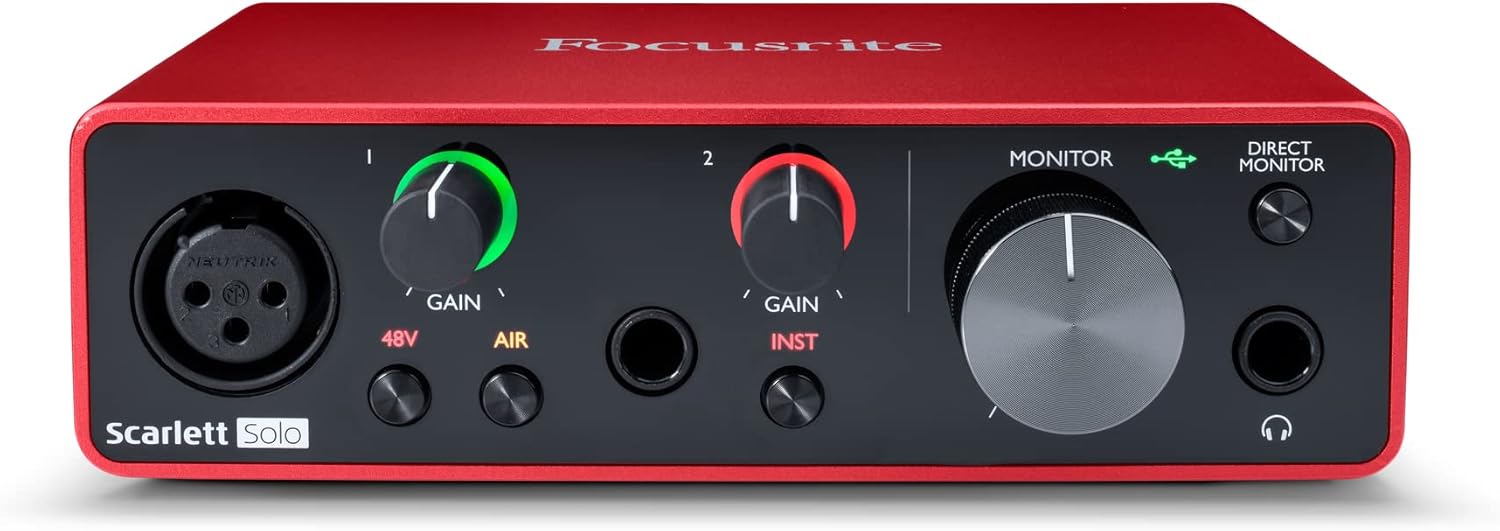
3Focusrite Scarlett Solo 3rd Gen USB-C Audio Interface
The Scarlett Solo 3rd Gen remains a sensible pick for shoppers who want a proven, compact interface. It is the older sibling of the 4th Gen Solo, and the listing still pitches it as a studio quality route to music and podcast recording. Its USB-C connection keeps it current for modern laptops, and its feature list covers the basics well. Value focused buyers often look at previous generation gear first. Many home studios have been built around this design.
Look closely at the specifications. The listing says the converters let you record and mix at up to 24-bit/192kHz, and it mentions high performing mic preamps with a switchable Air mode for extra clarity on acoustic instruments. Two high-headroom instrument inputs accept guitar or bass, and the text says they help avoid clipping. Two low-noise balanced outputs feed monitors, and a headphone output allows private listening. The Air switch is a quick way to brighten dull acoustic recordings.
This version suits students, hobbyists and creators building a first home setup on a modest plan. A guitarist who also sings can capture both, and a bassist can plug in directly. Streamers who play music over their talk can route audio from a streaming service through the outputs, as the listing mentions playback from popular music apps. The included software suite gives a starting point for beginners. It also works as a quiet backup interface for a second room.
The main caveat is that it lacks the Auto Gain and Clip Safe tools found on the newer generation, so you set levels by hand. Practice watching the meters and leave some headroom. The listing also describes only one mic style input path through the preamp, so check how many mics you plan to use. Monitor at a comfortable volume, because quiet listening is kinder to your ears over time. Check the current listing for exactly what is bundled today.
Proven compact design
Good headroom on instrument inputs
Balanced outputs for monitors
Air mode adds clarity
No Auto Gain feature listed
Older generation hardware
4Universal Audio Volt 2 USB Audio Interface
The Universal Audio Volt 2 stands out for its flavour. Where many interfaces chase a clean, neutral sound, this one adds a Vintage mode that the listing links to classic 610 preamps. That gives singers and guitarists a one button way to add warmth and body while recording. It earns a place near the top of this list for creators who care about tone as much as convenience. Tone seekers tend to enjoy that approach.
The listing states quality of up to 24-bit/192kHz and describes crystal clear converters. It also bundles the LUNA Digital Audio Workstation and gives access to UAD plug-ins and instruments, so the box connects to a wider production ecosystem. Tips and tutorials aimed at beginners through advanced users are mentioned, which lowers the barrier for newcomers. Support is listed for macOS, Windows, iPad and iPhone running iOS 14 or later. Together, the software and hardware form a complete starter studio.
Choose this model if you track vocals, acoustic guitar or podcast voice and want a gentle character on the way in. Mobile creators will like the iPad and iPhone support, which turns a tablet into a small studio. Producers who plan to expand into plug-in processing later get a natural path through the maker’s software. Beginners benefit from the tutorials rather than facing a blank screen. Its approachable layout keeps experiments simple.
Read the fine print on power. The listing says an external Volt power supply is required, and iPhone use needs an Apple Lightning to USB Camera Adapter, except iPads with USB-C. That means more cables in your bag than some rivals. Vintage mode colours the sound, so decide whether you want it before a long session. Keep your headphone level conservative while you judge the tone. Plan your cable lengths before you set up the desk.
Vintage mode adds warmth
LUNA software included
Mobile device support
Tutorials for beginners
External power supply required
Extra adapter needed for iPhone
5Audient Audio Interface iD4 MKII
The Audient iD4 MKII is the sturdy, studio minded choice. It is the successor to a model the listing describes as a great success, and it aims to move the sound up another level. Its all-metal desktop housing signals a different priority from plastic budget boxes: durability. For a creator who plans to keep the same interface for years, that build is a strong selling point. That choice often pays off for busy desks.
Inside, the listing points to new converter technology and a Class A microphone preamp taken from the maker’s high end ASP8024 HE console. A high-speed USB-C port handles data and power, so you need fewer cables. Monitor mix and monitor panning functions let you blend what you hear from the computer with what you are recording, and two headphone outputs allow a performer and a producer to listen together. The extra monitoring tools give small sessions a more professional feel.
This unit suits vocalists, producers and small project studios that want a premium feel on the desk. Two headphone outputs help duo sessions or a singer working with a friend. The listing gives its size as 133 by 120 by 40.7 mm and its weight as 740 g, so it feels solid and stays put on the table. It works with Mac, PC and iOS, which gives flexibility for mobile ideas. Singers who like to hear a producer’s feedback live will enjoy that flexibility.
The weight that makes it feel durable also makes it less pocket friendly than lighter boxes, so travelling musicians should consider that. The listing mentions a one metre USB-C cable in the box, which may be short for some desk layouts. The name suggests a compact input count, so larger sessions may call for more channels. Keep headphone volume moderate, especially when two people share the monitor mix. Measure your desk space before ordering.
Class A mic preamp
All-metal housing
Two headphone outputs
Monitor mix and panning
Heavier than plastic rivals
Limited channel count
6Motu M4 4×4 USB-C Audio Interface
The MOTU M4 is the interface for people who like to see what is going on. The listing describes a 4-in/4-out USB-C design with two microphone preamps, and it adds an LCD screen to the feature list. A display makes level monitoring easier than guessing from a ring of lights. For creators who like clear feedback, that screen is the main reason this model earns its place. Visual feedback is a real help in a dim room.
The short feature list gives a clear picture. Hardware monitoring is included, so you can hear yourself with little delay while recording. A loopback function lets you capture computer audio, which helps streamers and tutorial makers who want to record a game, a browser or a backing track alongside a mic. The listing also mentions more than 6 GB of free content for Mac, PC and iOS, which adds sounds and software to get started. These tools cover most streaming and tutorial needs.
Four inputs and four outputs give it more room than the two channel boxes on this list. A songwriter can record a mic and a guitar while sending a stereo mix to monitors and a separate feed to another destination. Streamers, podcasters with a co-host, and small bands recording in stages all fit the profile. It is a sensible next step for someone who has outgrown a basic two input unit. Its extra channels also leave room for future expansion.
The data on this listing is brief, so details such as converter specs are not spelled out here; check the full product page before buying. More outputs means more cables, so plan your desk space. Loopback setups can feel confusing at first, so read the manual and run a short trial recording before an important session. Always turn monitors down before plugging in a new source. Taking notes on your settings helps you repeat a good setup.
LCD screen for clear levels
Loopback for streaming
Four inputs and outputs
Hardware monitoring included
Listing details are brief
More cabling to manage
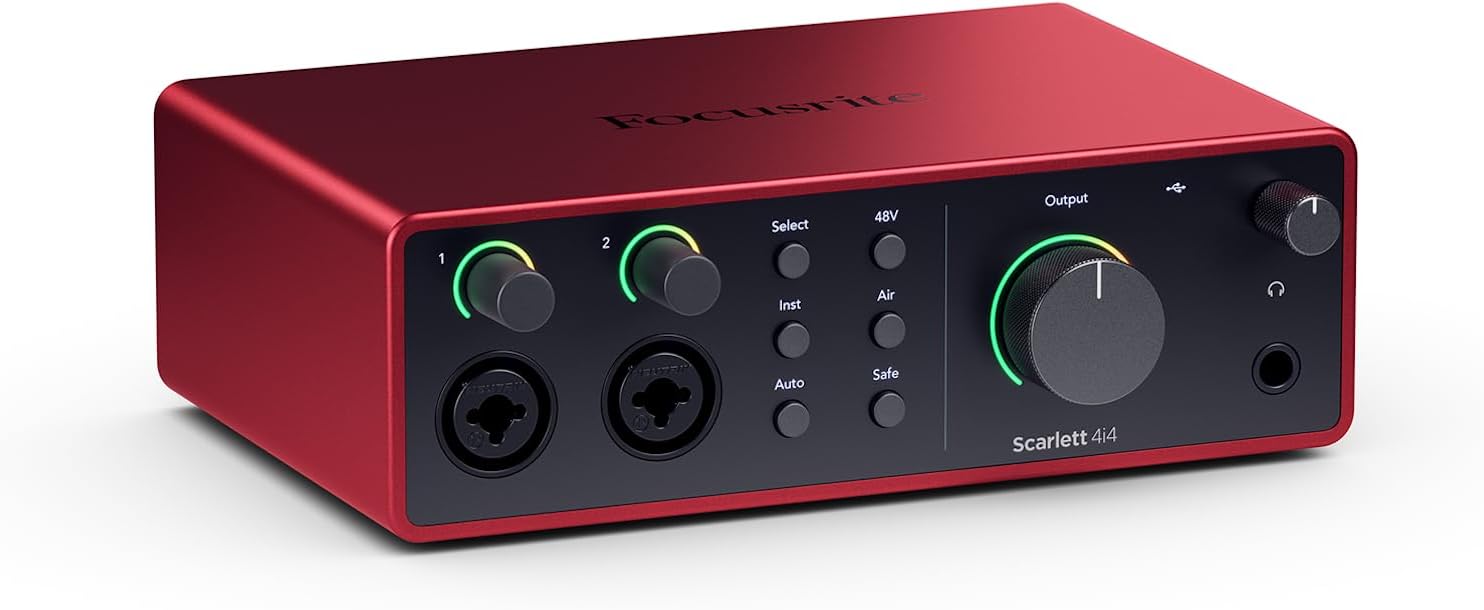
7Focusrite Scarlett 4i4 4th Gen USB-C Audio Interface
The Scarlett 4i4 4th Gen is the studio hub of the family. The listing calls it the music maker’s hub and says it connects mics, guitars, synths and drum machines. That wide list of gear is the whole point. If your desk has more than a mic and a guitar, this model gives you somewhere to plug everything in and keep a clean workflow in one place. Gear collectors will see the appeal at once.
The numbers are specific. Two Scarlett 4th Gen mic preamps, two Hi-Z instrument inputs, four line inputs and four line outputs are listed, along with MIDI input and output. The listing repeats the 120dB dynamic range claim and the same converters as the maker’s flagship interfaces. Air mode, Auto Gain and Clip Safe are included too, so the clever recording helpers from the smaller models carry over to this larger one. Those helpers keep sessions moving even when the desk is busy.
Electronic musicians are the obvious audience, since synths and drum machines usually use line connections and MIDI. Beatmakers who record vocals over hardware loops will appreciate the mix of inputs. Producers who want to route audio out to outboard effects can use the four outputs. Streamers with several sound sources, such as a mic and a mixer, can also make good use of the extra channels. MIDI connections add control options for hardware keyboards.
With more connections comes a need for planning. A small desk can fill up quickly once mics, synths and cables are all attached, so label your cables. Beginners who only record a voice may find this more box than they need and could save space with a Solo or 2i2. Remember to switch off phantom power before connecting gear that does not need it, and keep volume sensible. A power strip and cable ties keep the area neat.
Plenty of line inputs and outputs
MIDI connections included
Two mic preamps
Auto Gain and Clip Safe
More than a single voice setup needs
Takes more desk space
8Elgato Wave XLR MK.2 USB Audio Interface and DSP
The Elgato Wave XLR MK.2 is the specialist on this list. Rather than speaking to guitarists and band recordists, it speaks to people who talk for a living: streamers, podcasters and video creators. The listing calls it a USB audio interface and DSP mixer, which tells you that processing is built in. For a voice focused desk, that is a strong pitch. Many streamers like having everything in one unit.
Its headline numbers are an 80dB gain for any XLR mic and a powerful headphone amp output. Resolution is listed at 24-bit and 48kHz, with ultra-low-latency monitoring so you hear what your audience hears. Onboard effects include a voice enhancer, a compressor and EQ, and the Wave FX Processor combines DSP effects and VST plugins in a single chain. Touch control with LED feedback lets you adjust levels and mute instantly. Keeping effects in the box reduces the need for extra software tweaks.
Content creators who run live shows will value instant muting and visual level feedback, since a mistake on air is hard to undo. Hard to drive dynamic mics, which often need plenty of gain, are a good match for that 80dB figure. The Wave Link app, which the listing says is natively integrated, handles routing, effects and monitoring, helping people who juggle chat, game audio and a mic. Its design leans toward spoken word more than instrument recording.
The sample rate listed is 48kHz, which suits streaming and speech but may not be what a music producer wants for 192kHz work. The tool also leans on the maker’s software, so you should be comfortable installing and learning an app. It is described around XLR mics, so a guitar player may prefer a Scarlett. Set headphone levels carefully, because a powerful amp can be loud. Spend a little time learning the app before going live.
Large gain for XLR mics
Built-in voice effects
Instant touch mute
Wave Link routing
Music focus is limited
Relies on companion software
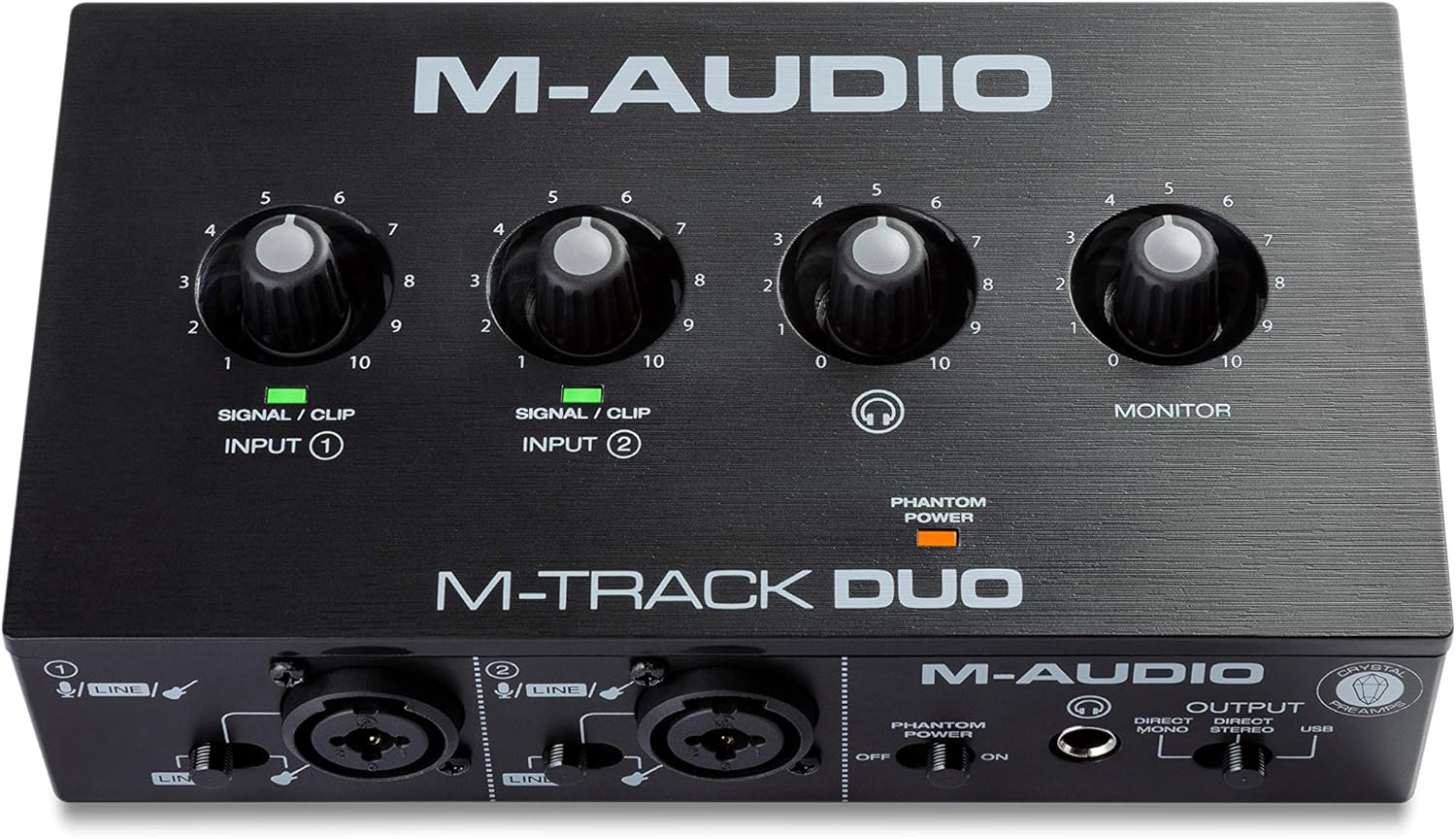
9M-AUDIO M-Track Duo USB Audio Interface
The M-AUDIO M-Track Duo is the go-to for shoppers who want a straightforward two channel box with a friendly feature list. The listing says it covers podcasting, recording and live streaming, and describes it as a portable USB sound card for Mac or PC. For anyone building a first recording corner, it offers a clear value story without a complicated control surface. It keeps the barrier to entry low for new creators.
The listing names two combo XLR, line and instrument inputs with phantom power, so mics, guitars and line sources can all connect. Audio resolution is listed at 48kHz. A quarter inch headphone output and stereo quarter inch outputs give flexible monitoring, while a USB or Direct switch provides zero latency monitoring. The Crystal Preamps are said to suit all mics, including condenser models, and MPC Beats software from Akai Professional is included. That mix of features covers a lot of ground for the size.
This model suits podcasters with a co-host, streamers adding a quality mic, and guitarists who sing. The Direct setting lets you hear yourself without a delay, which keeps vocal takes comfortable. Beginner producers who like beat making will enjoy the included MPC style software as a creative starting point. Students on a limited plan can build a recording kit around it and upgrade parts later. It is a sensible way to learn how an interface fits into your workflow.
Be mindful of the 48kHz resolution, which is fine for speech, streaming and most music projects but lower than the figures some competitors quote. The listing text is shorter on build details, so manage expectations about premium finishes. Condenser microphones need phantom power switched on, while some ribbon mics can be damaged by it, so read your mic manual. Keep monitoring volume low in small rooms. Try a short recording before a big session.
Two combo inputs
Phantom power for condenser mics
Direct monitoring switch
Beat making software included
48kHz maximum listed
Basic feature set
10Focusrite Scarlett 16i16 4th Gen USB-C Audio Interface
The Scarlett 16i16 4th Gen is the big one. The listing calls it the producer’s interface, and the figures back that up: 16 inputs and 16 outputs, including two mic preamps, Hi-Z, line inputs, ADAT, S/PDIF and MIDI I/O. This is not a first purchase for most people. It is the choice for a growing studio that wants to plug in a lot of gear at once. It sits at the top end of the Scarlett line.
The detailed specifications are impressive. The listing says the 4th generation preamps provide 69dB of gain, with two Hi-Z inputs and six line inputs. Converters run at 24-bit and 192kHz, taken from the maker’s RedNet range, with a stated dynamic range of 122dB. Air modes add presence and harmonic drive in the style of classic consoles, and Auto Gain and Clip Safe speed up setup and protect against loud peaks. Taken together, these features support serious multitrack work.
Home studio owners with multiple synths, a drum machine, outboard processors and an expansion unit will find the ADAT and S/PDIF connections a gateway to more channels. A small band can capture several sources in one session. Educators setting up a teaching room could also use the large count. The bundled software includes Pro Tools Intro+, Ableton Live Lite, Cubase LE and Hitmaker Expansion. Larger rooms and shared studios will make the most of it.
Scale brings cost in space and complexity. Only two mic preamps are listed, so a full multi mic drum session would need extra preamps through ADAT. Beginners with one mic will pay for connections they never use, and a smaller model suits them better. Plan your cable routing and power carefully, and always keep monitor volume moderate when many sources are active at once. Document your routing so you can recall it later.
Huge channel count
ADAT and S/PDIF expansion
122dB dynamic range
MIDI I/O included
Only two mic preamps listed
Overkill for single voice use
How to Choose the Best Audio Interfaces
What an audio interface actually does
An audio interface is a small box that sits between your microphones or instruments and your computer. It turns the analogue signal from a mic into digital data and turns playback from the computer back into sound you can hear in headphones or on speakers. A laptop headphone jack can do the second job, but it has no real mic input and limited sound quality for recording. Think of it as the bridge between your gear and your software.
Most interfaces also give you a preamp, which raises the weak signal from a microphone to a usable level. Many add instrument inputs for guitar and bass, a headphone output with its own volume knob, and outputs for studio monitors. In short, an interface gives a home studio the connections and clean conversion that a computer lacks. Once you grasp those basics, spec sheets become much easier to read.
Inputs and outputs: how many do you need
Count the sources you plan to record at the same time, not the ones you own. A solo singer songwriter needs one mic and one instrument input, which makes a Solo class model plenty. A duet, a podcast with a guest, or a stereo keyboard calls for two inputs, which is where a 2i2 style box comes in. That planning step saves money on gear you would never plug in.
Outputs matter too. A pair of balanced outputs feeds a set of studio monitors, while extra outputs let you send audio to a second pair of speakers, a headphone amp or outboard gear. Buying a few more channels than you need today is wise if you expect to add synths or a drum machine within a year. It also keeps your desk simple and your routing easy to follow.
Microphone preamps and phantom power
The preamp is the part that shapes how clean a mic recording sounds. Interface makers highlight different strengths, such as clear and neutral tone, a vintage flavour, or a Class A design. Listings often mention gain, measured in decibels, which tells you how much boost the preamp can give to a quiet mic. A quick check of your mic type avoids surprises later.
Condenser microphones need phantom power, usually 48 volts, switched on from the interface. Dynamic mics do not need it, and some ribbon mics can be harmed by it. Always turn phantom power off before plugging or unplugging a mic, and read your mic manual so you know which type you own. Good gain staging at this stage gives a cleaner recording overall.
Sample rate and bit depth explained in plain words
Sample rate describes how many times per second the interface measures the sound, and bit depth describes how finely it measures each sample. Listings on this page mention 24-bit and figures such as 48kHz or 192kHz. Higher numbers capture more data, but they also create larger files and demand more from your computer. Understanding these terms keeps you from paying for numbers you will never use.
For most podcasts, streams and songs, 24-bit at 44.1 or 48kHz is more than enough. Higher rates can help in specific work such as sound design, but they are not a shortcut to better music. Dynamic range, the gap between the quietest and loudest signals, often matters more to how clean a recording feels. Choose the settings that match your project, then keep them consistent between sessions.
Latency and direct monitoring
Latency is the small delay between making a sound and hearing it back through your computer. Even a short delay can feel strange when you sing or play, because your ears get two versions of your voice. Good drivers and a fast connection reduce the problem, but they do not remove it fully. Setting a comfortable level before you record avoids sudden loud surprises.
Direct monitoring solves this by sending your input straight to the headphones before it goes through the computer. Several interfaces here offer a direct monitor switch or hardware monitoring for that reason. Use it while tracking, and then switch to computer playback when you want to hear effects from your recording software. Make a habit of checking which source you are hearing before each take.
USB-C, power and computer compatibility
Most modern interfaces connect over USB-C and draw their power from the computer, so you need no separate adapter. This keeps your desk tidy and lets you move the box between rooms. Check whether the listing says class compliant or names the operating systems it supports, because that tells you if it will work with your Mac, PC or tablet. Always confirm port type and cable length before you place an order.
Some models, as the Volt 2 listing states, need an external power supply for certain uses, and iPhone connections may require a camera adapter. Read those notes before you buy. A short cable can also become annoying, so a spare USB-C cable of a suitable length is an affordable, practical add on for most desks. Keeping a spare cable in your bag prevents delays when a session is booked.
Software bundles and what they give you
Many interfaces ship with recording software, plugins and sound libraries. The Scarlett listings name Pro Tools Intro+, Ableton Live Lite, Cubase LE and Hitmaker Expansion. The Volt 2 includes the LUNA workstation, the M-Track Duo includes MPC Beats, and the MOTU M4 mentions free content for Mac, PC and iOS. Open the software early and explore it before a deadline arrives.
Bundled software saves money, but you should treat it as a starting point. Light editions of paid programs limit track counts or features, which beginners rarely hit. Pick the workflow that feels natural to you, whether that is loop based, traditional multitrack or voice editing, and let the bundle help you decide what to try first. Over time you may swap in a program that suits your style better.
Build quality and portability
An interface that lives on a desk gets knocked, plugged and unplugged often. Metal housing, as listed for the Audient iD4 MKII, adds durability and weight, while lighter plastic boxes are easier to slip into a backpack. Think about whether the box will stay in one room or travel to rehearsals and friends’ houses. Consider how often the box will move before you pick a design.
Knobs and connectors also deserve a look. Combo jacks that take both XLR and quarter inch plugs save space and add flexibility. A headphone output on the front panel is easier to reach than one on the back. If you travel, check the listing for dimensions and weight, and keep a small pouch for cables. Small choices like these add up to a more comfortable daily routine.
Choosing for streaming, podcasting and voiceover
Spoken word creators need clean gain, easy muting and a dependable headphone feed. The Elgato Wave XLR MK.2 is built around these needs, with onboard voice effects, touch muting and a routing app. Boxes with a loopback function, like the MOTU M4, let you record or stream computer audio together with a mic. Practice your routing once before a live show.
A basic two input model such as the M-Track Duo or a Scarlett 2i2 also works well for a host and a guest. Whichever you pick, a dynamic mic with a pop filter and a quiet room will do more for speech clarity than any extra feature. Take short breaks and keep headphones at a comfortable level. Good housekeeping on files and settings keeps long projects organised.
Choosing for guitarists and songwriters
Guitar players need a Hi-Z instrument input, which matches the high impedance of a pickup so the tone stays full. Most models on this list include one or two. Look for headroom on those inputs so loud strumming does not clip, and consider features like Air mode or Vintage mode if you want extra character when recording. Experiment with mic placement as well, because small moves change tone a lot.
Songwriters often record a mic and a guitar together, which suits a two input interface best. A single input Solo style model works for one source at a time and keeps costs sensible. Monitoring is important too, so make sure the box has a headphone output with enough volume for quiet practice rooms. Short practice runs will help you learn how your own instrument responds.
Upgrading, resale and future proofing
Think about where your setup will be in two years. If you expect to add synths, a drum machine or a second singer, a model with extra line inputs and outputs saves you from buying again. Boxes with ADAT or S/PDIF, like the 16i16, can add more channels later through expansion units. Planning ahead keeps your gear list focused and your budget healthy.
Sound quality differences between mainstream interfaces are modest, so avoid overspending on features you will not use. Keep your original packaging and receipts, and look for current driver updates on the maker’s website before you buy. A stable computer connection and good headphones usually improve results more than a premium model name. Small upgrades to headphones, mics and room treatment often bring more joy than a bigger box.
Frequently Asked Questions
What is an audio interface and do I need one?
An audio interface connects microphones and instruments to your computer and sends clean sound back to headphones or speakers. If you want to record vocals, guitar or podcasts with a proper XLR mic, you need one. A basic headphone jack cannot do that job well.
How many inputs should I choose?
Pick the number of sources you will record at the same moment. One mic or guitar fits a Solo class box, two inputs suit duets or a mic plus an instrument, and four or more suit synths, drum machines or small bands.
What does phantom power do?
Phantom power sends a small voltage down the XLR cable to power condenser microphones. Dynamic mics do not need it. Turn it off before connecting gear you are unsure about, and check your microphone manual, since some ribbon mics can be damaged by it.
Is 192kHz better than 48kHz for home recording?
Not always. A higher sample rate captures more data but makes bigger files and needs more computer power. For podcasts, streams and most songs, 24-bit at 44.1 or 48kHz is plenty, so choose a model by features rather than the largest number.
What is direct monitoring?
Direct monitoring routes your input signal straight to headphones before it travels through the computer. That removes the small delay called latency, so your voice or guitar feels natural while you record. Several interfaces here include a switch or hardware monitoring for this reason.
Which model is best for beginners?
The Scarlett 2i2 4th Gen is our top pick because Auto Gain and Clip Safe help new users set levels. The Solo 4th Gen suits one source at a time, and the M-Track Duo is a simple two input alternative.
Can I use these with a phone or tablet?
Some can. The Volt 2 listing mentions iPad and iPhone support, and the Audient iD4 MKII and MOTU M4 mention iOS compatibility. Check each listing for power needs and adapters, since an iPhone may need a camera adapter and an iPad with USB-C may not.
Do I need studio monitors as well?
You can start with closed back headphones for recording, and add monitors later for mixing. Interfaces with balanced outputs, like the Scarlett Solo 3rd Gen, can drive a pair of powered monitors when you are ready for them.
Are bundles with software worth it?
Bundled software is helpful for beginners because it gives you a recording program and plugins on day one. The included versions are often limited editions, so treat them as a starting point and upgrade only when you hit a real limit.
Do the prices on this page stay the same?
No. Prices and stock change often, so this guide does not quote them. Each product links to its live listing, where you can check the current price, the latest bundle contents and the full specification before you buy.
The Bottom Line
The Focusrite Scarlett 2i2 4th Gen remains our top pick for most people, thanks to two inputs, a stated 120dB dynamic range and helpful tools like Auto Gain and Clip Safe. Pick the Solo 4th Gen for one source, the Volt 2 for vintage colour, or the iD4 MKII for a durable Class A design.
Streamers can look at the Elgato Wave XLR MK.2, and growing studios can aim for the MOTU M4, 4i4 or 16i16. Check the live listings for current prices and bundles, and keep your headphone volume low and comfortable as you record.
Updated for the 2027 buying season. Amazon listings and availability change often, so check the product page for current details.
Write Your Review
No reviews yet. Be the first to share your experience!