

As an Amazon Associate we earn from qualifying purchases. If you buy through links on this page we may receive a commission at no extra cost to you. Product details come from Amazon listings and can change.
Finding the best switch headsets is trickier than it sounds. The Nintendo Switch family has a single USB-C port, a 3.5mm jack on most models, and a very different set of rules for wireless audio than a PC or a PlayStation. Some headsets plug in and work at once, while others need a small dongle or a Bluetooth mode that behaves differently depending on the console.
This guide covers ten headsets that list Switch support, from officially licensed wired models to 2.4GHz wireless designs and a few cross platform options for people who also play on PC or phone. It is written for handheld players, docked players, kids and parents shopping together, students who travel with a console, and anyone who wants clear voice chat without buying a pile of adapters.
Prices change often, so we link every pick to a live listing instead of quoting numbers that go stale. Check the compatibility notes on each listing before you buy, especially if you own the newer Switch 2 or a Lite model. Keep volume at a moderate level during long sessions, and take breaks.
The Turtle Beach Stealth 500 is our top pick because it pairs a low latency 2.4GHz link with Bluetooth and a long battery. The Turtle Beach Airlite Fit is the best wired choice for comfort, and the Razer BlackShark V2 X suits players who want bigger drivers and a sharper microphone.
Key Takeaways
Best Switch Headsets at a Glance
| Product | Our score | |
|---|---|---|
| 9.0 / 10 | Check Price → | |

Turtle Beach Airlite Fit Wired Gaming Headset for NintendoBest Wired Comfort
|
9.2 / 10 | Check Price → |

Turtle Beach Recon 70 Wired Multiplatform Gaming HeadsetBest for Spatial Audio
|
8.8 / 10 | Check Price → |

PDP Airlite Wired Gaming Headset for Nintendo Switch 2Best Portable Pick
|
8.8 / 10 | Check Price → |
| 8.8 / 10 | Check Price → | |

PDP Gaming AIRLITE Stereo Headset with Mic for NintendoBest Lightweight
|
8.8 / 10 | Check Price → |

Ozeino Wireless Gaming Headset for PS5Best Wireless for PS5 and Switch
|
8.6 / 10 | Check Price → |

CG-01 2.4Ghz Wireless Gaming Headset for Nintendo Switch丨OLED丨LiteBest Wireless Value
|
8.4 / 10 | Check Price → |

Razer BlackShark V2 X Gaming Headset: 7.1 Surround SoundBest for Sound Detail
|
8.8 / 10 | Check Price → |

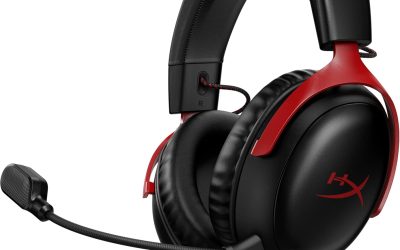
HyperX Cloud AlphaBest Build Quality
|
8.4 / 10 | Check Price → |
How We Chose the Best Switch Headsets
This is a research based guide, not a lab comparison. Every pick was chosen by reading the product listing details closely: the stated connection types, driver sizes, microphone design, controls, battery claims and the platforms each maker says the headset supports. We then matched those features to real use cases such as handheld play, docked play, travel and voice chat with friends.
We looked for clear Nintendo Switch compatibility first, then weighed comfort claims, how easy the setup sounds, and how well the feature list fits the price tier a shopper might expect. Each pick carries an editorial score out of 10 on the site, which reflects fit for the keyword rather than measured performance. Where a listing is vague or contradicts itself, we say so and speak in general terms.
In-Depth Reviews
1Turtle Beach Stealth 500 Wireless Gaming Headset Nintendo Switch

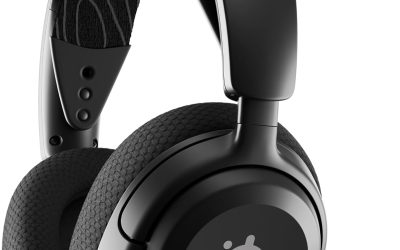
The Turtle Beach Stealth 500 earns the top spot because the listing calls it the first officially licensed wireless headset for Nintendo Switch 2. For a console that has had few wireless options built around it, that detail matters. The pitch is simple: a headset that connects the way the console expects, without a patchwork of third party adapters, and without cables running to a docked screen. Buyers who have waited for an official wireless answer on the newest console will see why this model leads the pack, since it keeps the setup story short and clear.
Two connection modes sit at the center of the design. A low latency 2.4GHz link is meant for Switch 2 gaming, which keeps audio close to what is on screen, while a separate Bluetooth connection is there for mobile devices. The listing also mentions 40mm drivers for game audio and Swarm II software for mobile and desktop, which is where audio and microphone adjustments are made. In practice that means plugging in the dongle, powering on the headset and letting the two find each other, while the mobile Bluetooth link stays available for calls and media.
This model suits players who want one headset for the couch, the dock and the commute. Switch 2 owners who chat with friends will like the wireless freedom, and people who also read, stream or watch on a phone can pair over Bluetooth instead of switching headphones. Families may like that it is licensed, which usually signals a smoother setup. It also works well for anyone sharing a console with family, because the licensed status suggests fewer surprises about which port or menu to use at the start.
A few caveats are worth knowing. Wireless headsets need charging, and the listing states a 40 hour battery with quick-charge, so a short top up before a trip is easy. Check the compatibility line before ordering if you own an older Switch, because the wording is built around Switch 2. Set volume sensibly, since a closed fit can encourage turning the level up. Small habits help here, such as charging after a long weekend and keeping the dongle in a pocket of the case so it never wanders off.
Licensed for Switch 2
Two wireless modes
Long stated battery life
Software for tweaks
Needs charging
Wording targets Switch 2
2Turtle Beach Airlite Fit Wired Gaming Headset for Nintendo
The Turtle Beach Airlite Fit takes the wired route and keeps things refreshingly simple. It is listed as officially licensed for Nintendo Switch 2 and also works with the original Switch family, so one purchase covers a household with mixed consoles. Plugging in means no pairing menus, no charging and no dongle to lose in a bag. For shoppers comparing it with pricier wireless models, the appeal is how little there is to go wrong in daily use.
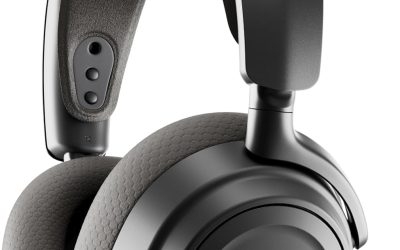
Sound comes from 40mm speakers, and the ear cushions are described as premium and noise-isolating with an over-ear fit. The microphone is bi-directional and sound isolating, and it flips up to mute. An on-ear volume control gives quick access to level changes, which is handy in handheld mode where reaching for the console menu interrupts play. Together these touches mean you can adjust volume, silence the mic and keep playing, all without opening a menu or fumbling with a small button on the console.
This is a natural fit for kids and teens, commuters, and anyone who plays in short, frequent sessions. Because the design is lightweight, it should feel easy on the head over long evenings, and because it is wired there is no delay to think about. Parents often prefer this kind of headset for its predictable behavior. It is the sort of headset a parent can hand over at the start of a car ride with almost no explanation needed.
The trade off is the cable. You give up the freedom of a wireless headset, and the cord can tug on a handheld console if you move around. Tuck it under a sleeve or clip it to clothing while traveling. As always with games, a moderate volume is kinder to your ears than maximum level for hours. If the fit feels loose or tight at first, take a minute to slide the headband to the right length so the cushions rest evenly over the ears.
Simple plug and play
Over-ear cushions
Mic flips to mute
Light on the head
Cable limits movement
No wireless mode
3Turtle Beach Recon 70 Wired Multiplatform Gaming Headset
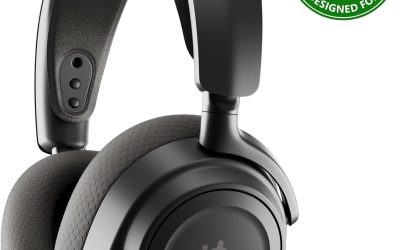
The Turtle Beach Recon 70 is aimed at players who split time between a console and other devices. It is described as a wired multiplatform headset, officially licensed for Nintendo Switch 2, which gives it a wider reach than a model built for one console only. That flexibility makes it a sensible single headset for a shared gaming desk. That wide reach is helpful when a household owns several systems and nobody wants to buy a separate headset for each one.
Features are kept practical. The listing mentions 40mm speakers, noise-isolating ear cushions, a lightweight frame and a flip-to-mute microphone. The standout line is compatibility with spatial audio technologies, which means that on a platform offering a spatial option, the headset is designed to work with it rather than against it. The flip-to-mute arm keeps the microphone out of the way until it is needed, and the lightweight frame is meant to keep pressure low during longer sessions.
Pick this if you jump from the Switch to a PC or another console and want a headset that follows you. It also suits students who game on a laptop between classes, and younger players who want a straightforward set of controls. The listing does not promise anything exotic, which is part of its appeal. It is also a fair option for shared family use, since the controls are easy to understand and there is nothing to pair or charge.
Remember that spatial audio is a software feature of the platform, not something the headset creates alone. Settings vary by device, and the Switch itself offers fewer sound options than a PC. Try a few game and music examples at a modest volume to judge the soundstage, and adjust the headband so the cushions sit evenly. Treat any claim about immersion as a starting point, and compare how games sound with and without spatial processing before you settle on a preferred setting.
Multiplatform use
Spatial audio friendly
Lightweight design
Licensed for Switch 2
Wired only
Spatial audio depends on platform
4PDP Airlite Wired Gaming Headset for Nintendo Switch 2
The PDP Airlite Wired Gaming Headset is built for the Switch family and listed for the Switch 2, Switch Lite and OLED models. It is a straightforward, lightweight wired headset, and the listing leans on a good length of compatibility notes. It is the kind of headset you toss into a case next to a handheld console and forget about. Its mix of light weight and wide compatibility makes it feel more like a general purpose accessory than a niche console add-on.
Stereo sound comes from 40mm drivers, with the maker describing strong bass and crisp highs. The ear cups are noise-isolating with soft foam cushions, and the headband is adjustable. A flexible noise-canceling microphone flips to mute, while the volume control on the ear cup lets you adjust levels without leaving the game. Together, the noise isolation and the mic design give a tidy package for chatting with teammates in a room that is not perfectly quiet.
Because the listing also names smartphones, tablets, iPad, Mac, Windows PC and VR devices, this one makes sense as a travel headset. A student can use it on a console in the evening and on a laptop in the morning. Younger players will likely appreciate the lightweight build and the simple controls. That versatility is a big plus for families, because the same headset can follow a child from the Switch to a tablet during a long journey.
Keep in mind that a wired headset only works as well as the jack it plugs into, and some phones and tablets lack a headphone port, so an adapter may be needed. Compatibility lists can be broad, so confirm your exact device before purchasing. Wrap the cable loosely when packing to protect the connector. Before ordering, scan the full device list in the listing and match it to what you own, so there are no surprises when the box arrives.
Broad device list
Lightweight build
Adjustable headband
Easy ear-cup volume
Adapter may be needed
Wired cable
5PDP Gaming LVL40 Airlite Stereo Headset for Nintendo Switch/Lite/OLED

The PDP Gaming LVL40 Airlite shares its core design with other PDP headsets but stands out with a Mario Neon red and blue look. It is a stereo wired headset designed for the Nintendo Switch, Switch Lite and OLED, and it is officially licensed by Nintendo. For players who like their gear to match the console, the colorway is the real hook. That visual identity is a real selling point, since many players treat their console accessories as part of a matching setup.
The listing describes 40mm speaker drivers with strong bass and crisp highs, and a lightweight build meant for long sessions. Cushioned ear cups isolate noise, the headband adjusts, and the flexible microphone flips up to mute. A volume control on the ear cup makes quick adjustments possible without pausing the game. The padded ear cups and breathable foam are meant to keep things comfortable, and the adjustable headband allows a closer fit as children grow.
This model fits younger players, collectors of themed accessories, and gift shoppers who want a safe, recognizable choice. It also works across several other devices according to the listing, from phones and tablets to PCs and Macs, so it will not sit unused when the Switch is away. Because it carries the same licensed status as other headsets in the PDP family, it is also a reliable gift idea for birthdays and holidays.
On the practical side, check which edition you are buying, since the same headset line comes in several colors and listings can look similar. A wired headset needs a 3.5mm connection, and younger players may need help adjusting the headband. Encourage breaks and moderate volume, and supervise listening for small children. If you are choosing between colorways, compare photos carefully and check that the listing matches the console model you own before you order.
Licensed design
Themed colors
Lightweight frame
Flip-to-mute mic
Colorway may not suit all
Wired connection
6PDP Gaming AIRLITE Stereo Headset with Mic for Nintendo
The PDP Gaming Airlite Stereo Headset is a no fuss choice that highlights its low weight. The listing quotes a 7 oz construction for all day sessions, and it is officially licensed by Nintendo for the Switch, Switch Lite and OLED. In a category full of long feature lists, this one sticks to a small set of essentials. Its modest spec sheet is not a weakness so much as a sign of a headset that focuses on being easy to live with.
Audio comes from 40mm drivers that the maker calls fine-tuned for immersive gameplay, surrounded by soft padded earcups. The sleek microphone is described as noise-canceling and includes a flip-to-mute feature. That is a short list, but it covers what most Switch players need for party chat and solo adventures. Players who enjoy cooperative games or friendly chat sessions will find that this basic combination covers most everyday needs without extra complexity.
Consider this model if headband pressure is your main worry. Younger players, smaller heads and people who wear glasses often prefer lighter headsets, though fit is always personal. It also suits anyone who wants a clean, simple gift for a console player without worrying about complicated setup. It also makes sense as a spare headset for a second console, a travel bag or a sibling who tends to borrow equipment.
The listing says little about extras like an on-ear volume wheel, so check the images before buying if that matters to you. Without a long spec list, it is smart to confirm cable length and connector type for your setup. Take care when folding or storing the headset so the microphone arm stays in good shape. Treat the weight claim as a helpful guide and judge actual comfort by how the headband sits on your own head after an hour or so.
Light 7 oz build
Padded earcups
Simple setup
Licensed for Switch
Short feature list
Controls not detailed
7Ozeino Wireless Gaming Headset for PS5
The Ozeino Wireless Gaming Headset is the pick for households that own a PS5 and a Switch. The listing promises a 2.4GHz dongle with both USB and Type-C ends, which the maker says delivers under 30ms of delay, and a title that advertises a 40 hour battery. Having both plug types in one package is the main reason it earns a place here. That combination of dongle ends is rare among Switch focused headsets and removes a common headache for mixed console homes.
Under the hood is a 50mm driver, larger than the 40mm units on many licensed headsets, along with lossless style 2.4GHz transmission as the maker describes it. Buttons on the ear cups handle volume, mute and calls, and the headset offers a dual mode design with Bluetooth. A 3.5mm wired mode is also mentioned in the listing. The maker frames this as a way to hear footsteps, reloads and voices more clearly, though results will depend on the game and on how you set your levels.
This headset suits a player who moves between a PS5, a PC and a Switch and wants to avoid swapping cables. The listing names Fortnite, Call of Duty and The Legend of Zelda as example games. Bluetooth is said to work with phones, laptops and the Switch, which gives it extra flexibility away from the TV. It is also a flexible pick for people who want to keep a single dongle in a bag and plug it wherever they happen to be playing.
Read the compatibility notes closely, because the listing warns that Bluetooth does not work directly with Mac, PS5, PS4 or PC without an extra USB Bluetooth adapter. Use the 2.4GHz dongle for those consoles, as the maker recommends. As a generic brand, check warranty terms and keep the dongle somewhere safe. Because the listing text is long and technical, read the compatibility bullets twice and confirm which platforms support each connection mode.
Two dongle ends
Large 50mm driver
Dual mode wireless
Works on many consoles
Bluetooth limits on PC and PS5
Lesser known brand
8CG-01 2.4Ghz Wireless Gaming Headset for Nintendo Switch丨OLED丨Lite
The CINPUSEN CG-01 is a wireless gaming headset that leans heavily on the Nintendo Switch in its marketing. The listing says it connects through a Type-C connector and a USB-A adapter, so it can sit on a docked console or a PlayStation, a Mac or a laptop. For shoppers who want wireless freedom without a big spend, it deserves a look. In a crowded field of wireless headsets, the long feature list and wide connection support make it stand out among the more affordable options.
Four connection methods are listed, including 2.4GHz wireless with a stated 15 meter range and Bluetooth 5.4. Drivers are 40mm, the ear pads use memory foam covered in breathable fabric, and a telescopic microphone is said to reduce background noise. That is a rich feature set for a modestly known brand. The memory foam pads are intended to adapt to the shape of the ear, which can help comfort, and the microphone extends and retracts to suit different moods.
This one fits teens, students and casual players who want to roam around a room or a living area. The long stated range is helpful for larger spaces, and the multiple connection types mean it can double as a phone headset on trips. Younger gamers may like the comfort focus, though sizing claims are worth checking. Households that mix a Switch with a PlayStation or a Mac will likely value the flexible connections more than any single headline spec.
Battery figures in the listing do not agree: the title mentions 40 hours while a bullet talks about 80 hours. Treat both as marketing claims and expect real use to vary. Noise reduction percentages given by makers are also hard to judge, so keep expectations realistic and use a moderate listening level. A good habit is to run a first session indoors near the console so you can confirm the connection is stable before you head out with it.
Four connection types
Memory foam pads
Long stated range
Telescopic mic
Battery figures conflict
Less established brand
9Razer BlackShark V2 X Gaming Headset: 7.1 Surround Sound
The Razer BlackShark V2 X is the pick for players who care about sound detail and a sharper microphone. It uses a plain 3.5mm connection, which means it can plug into a Switch, a PC, a Mac and PlayStation consoles. The listing also notes that an Xbox One stereo adapter may be required, a useful warning for multi console homes. For many buyers that cross platform reach is the biggest reason to pick it over a headset made for only one console.
Its 50mm Triforce Titanium drivers divide each unit into three parts so highs, mids and lows can be tuned separately, with titanium coated diaphragms for clarity. The HyperClear cardioid microphone is designed to favor your voice and reduce noise from the sides and back. Closed ear cups provide passive noise isolation rather than active cancelling. In short, the hardware design puts clean audio and voice pickup first, which suits both competitive matches and relaxed evenings.
This is a headset for competitive players, streamers on a small setup and anyone who wants a serious feel in a lightweight body. At 240g it is described as engineered for comfort, and the breathable foam cushions should help over longer play. It is a strong match for people who split time between Switch and PC. Streamers who record commentary on a modest budget may like the tight voice pickup, though a dedicated microphone will always offer more control.
Note that the 7.1 surround feature is software based and only available on Windows 10 64-bit, according to the listing. On a Switch, you get plain stereo through the jack. That is normal for the platform, but it means some of the headline features only matter on a PC. Wiping the foam cushions occasionally keeps them fresh. If you play mainly on a handheld console, keep in mind that the headset is a full size design and may feel large when you travel.
Large 50mm drivers
Closed passive isolation
Cardioid microphone
Light 240g build
Surround only on Windows
Stereo only on Switch
10HyperX Cloud Alpha
The HyperX Cloud Alpha has earned a loyal following for comfort and sturdy construction, and the listing describes it as signature award winning comfort. It plugs in through a 3.5mm port, so it works with the Nintendo Switch, PC, PlayStation and Xbox consoles, plus mobile devices. It is the heavyweight in this list for people who want a headset to last. Its long record on shopping pages is a sign of a design that many buyers have been comfortable with for years.
Dual chamber drivers are the core feature, designed to separate sound ranges for more distinction and less distortion. The frequency response is listed as 15Hz to 25,000Hz, which is a very wide range on paper. The frame is aluminum with an expanded headband, and the braided cable detaches and includes an in-line audio control. Taken together, these parts make the headset easy to maintain, since a damaged cable or microphone can be swapped without replacing the whole unit.
This is a good match for players who want one headset across a Switch, a PC and a phone. The detachable microphone is helpful when you just want to listen to music on the bus, and the removable cable makes replacement easier. Adults and teens with larger heads often like over-ear designs for this reason. It is also a sensible choice for a shared desk, because it works with almost anything that has a standard headphone socket.
It is not wireless, and the metal frame may feel heavier than plastic only designs, so judge comfort against your own preference. The in-line control helps with volume and mute, but remember that a cable is another thing to manage on a handheld. Store it with the cable loosely coiled, and keep volume at a safe level. If you wear glasses, spend a few minutes adjusting the headband and pads so that pressure around the frame stays low throughout the session.
Dual chamber drivers
Aluminum frame
Detachable braided cable
Detachable microphone
Wired only
Heavier metal frame
How to Choose the Best Switch Headsets
Wired or wireless for Switch: which one fits you
The first choice is wired or wireless. Wired headsets use a 3.5mm plug, work in handheld and docked modes, need no charging and have no delay to speak of. They suit kids, travelers and anyone who wants fewer things to manage. The downside is a cable that can snag. Battery and charging are the other key difference, and a headset that stays wired never asks for either.
Wireless models use a 2.4GHz dongle, Bluetooth or both. The 2.4GHz route is usually the better choice for games because it aims for lower delay. Bluetooth is handy for phones, though the Switch handles it differently from a PC, and delay can be noticeable. Always read the connection notes closely. Whichever style you choose, the best fit is the one that matches the place you play most often, whether that is a bedroom, a train or the living room.
Switch versus Switch 2 compatibility
Nintendo launched the Switch 2 alongside the original Switch family, and many headset listings now name both. Officially licensed wired headsets usually work across the Switch, Lite, OLED and Switch 2, since they use the same 3.5mm jack standard that older consoles have used for years. That is why a quick look at the specific wording for your own console saves time and avoids returns.
Wireless headsets are a different story. A dongle with a Type-C end works with the console port directly, but features such as in-game voice chat and Bluetooth audio depend on the system software. Read the compatibility line for your exact model, and look for wording about Switch 2 if you own one. When in doubt, a wired licensed headset is the safest starting point because it relies on a connector that has been standard for many years.
Handheld, tabletop and docked play
How you play matters. In handheld mode, the headset plugs into the top of the console, so a long cable can tug as you move. A shorter cord, or a wireless dongle in the bottom port, can feel tidier on the bus or on a couch. Players who switch between all three modes should keep a short cable and a dongle handy.
In docked mode the console sits near the TV, so a wired headset needs an extension or a long cable, while a wireless dongle in the dock removes the problem. Tabletop mode with a kickstand sits between the two, so a medium length cable usually works well. Think about where you play most. A small pouch for the headset, the cable and the dongle keeps everything together and prevents the common problem of leaving a key piece behind.
Driver size and sound quality
Most licensed headsets in this guide list 40mm drivers, while some others use 50mm. Larger drivers can move more air, but driver size alone does not decide sound quality. Tuning, the ear cushion seal and the quality of the signal all play a role, and listings rarely give enough information to judge. Think of driver size as one clue among many rather than a promise of better audio.
For Switch games, balanced sound with clear voices and footsteps matters more than huge bass. Look for headsets that describe clarity in the mids and highs, and consider how they handle music if you also listen on a phone. Spec numbers such as frequency range are helpful, but they are only part of the story. A comfortable seal, a sensible volume and a headset you actually enjoy wearing will do more for your gaming than any single number on a box.
Microphones and voice chat
Voice chat on Switch has long relied on a headset microphone plugged into the console or a phone app. Flip-to-mute microphones are popular because they make muting quick and obvious. Boom arms that swivel or detach also help when you want to listen only. A short listening session with a friend in a party chat is the quickest way to learn how your voice sounds through any microphone.
Noise-canceling or cardioid microphones aim to reduce what the mic picks up from the sides and behind. These designs help in a busy room, but results vary. If you chat with family, a flexible arm that sits near the corner of the mouth usually gives a more natural voice than one placed directly in front. Remember that a muted microphone is far better than a loud background, so use the flip-to-mute feature whenever you are not speaking.
Comfort, weight and fit
Comfort often decides whether a headset gets used. Lightweight frames, soft ear cushions and a well padded adjustable headband reduce pressure during long sessions. On-ear styles press on the ear, while over-ear cushions surround it, so try to match the design to how sensitive you are. Weight claims are helpful, but the shape of the headband and the size of the cups matter just as much.
Memory foam and breathable fabric pads can feel cooler than leather style covers, while leatherette can seal better and isolate more sound. Glasses wearers should look for softer pads, and younger players need a headband that adjusts well. Check weight claims in the listing and take breaks during long sessions. If a headset feels tight after an hour, loosen the band, shift the pads slightly and take a short break before continuing to play.
Battery life and charging
Wireless headsets give a stated battery life in hours, usually measured at a moderate volume. A figure around 40 hours is common in this category and should cover several days of casual play. Quick-charge features, where listed, give a few hours from a short top up. Cables for charging should be easy to find, so keep a spare near the console.
Treat battery claims as rough guides. Volume, connection type and any lighting effects change real use. When a listing shows two different figures, as happens with one model here, assume the lower figure to be safe. Charge before long trips, and carry a short USB cable for emergencies. A quick-charge feature is especially useful for students and commuters who forget to charge overnight and need a few hours of play before leaving.
Safe volume and kids
Headsets can be loud, and long hours at high volume are not a good idea. Keep the level moderate, take breaks every hour or so, and lower the volume if sounds feel uncomfortable. Closed ear cups can make it tempting to turn things up, so check the level from time to time. Many consoles and games also include sound and volume options, so use them if you are shopping for a younger player.
For kids, parents should supervise listening and set a sensible limit on the console itself. This guide does not promise that any headset limits volume unless the listing says so, and none of the listings here make that claim. Fit and adjustability matter, and a durable build helps with small hands. Talk with kids about why breaks and low volume matter, and make listening habits part of the normal routine around gaming.
Value and what to skip
Value is more than the lowest price tag. A licensed wired headset gives dependable compatibility, while a generic wireless model may add features at the cost of brand support. Weigh what you need: wireless freedom, a better microphone, or just a clean wired setup that will last. It also helps to read the full description of any accessory so you know what it can and cannot do.
Skip anything that is not an audio headset. Some Switch accessories, such as VR style goggles, show up in the same search results but do not give you sound. Also be wary of listings with unclear compatibility or conflicting numbers, and compare the connection notes before you click buy. A wise purchase balances features, comfort, brand support and the chance that you will still enjoy the product after the first few weeks.
Who should buy which headset
Choose the Turtle Beach Stealth 500 if you want the most complete wireless package for Switch 2. Pick the Airlite Fit or the PDP Airlite models for simple wired comfort at a friendly level of complexity. The Recon 70 suits spatial audio fans, and the PDP Mario Neon edition appeals to younger players. Each headset in this guide has a particular strength, so think about which of those strengths you would use most.
Go for the Razer BlackShark V2 X or HyperX Cloud Alpha if you also play on PC and care about sound detail or build. Choose the Ozeino or the CINPUSEN CG-01 when you want wireless across several consoles. Match the headset to your main device first, and then to your comfort needs. If you are still unsure, choose the model with the simplest setup, since a headset that is easy to use tends to be used more often.
Setup tips and care
Setup is usually simple. Plug a wired headset into the console jack, then raise the volume slowly. For wireless models, insert the dongle, power the headset, and wait for the light to confirm a connection. Check the console sound settings if audio does not appear straight away. For wireless units, a firmware or software update may be offered by the maker, so check the support page now and then.
Care extends the life of any headset. Wipe the ear pads with a slightly damp cloth, keep the cable loosely coiled and store the headset away from heat. Replace worn cushions if the maker sells them, and charge wireless units before storage so the battery stays in good condition. A small amount of regular care keeps microphones clear and cushions fresh, which also helps resale value when you eventually upgrade.
Frequently Asked Questions
Do all headsets work with the Nintendo Switch?
Most headsets that use a 3.5mm plug work in handheld mode, but features differ. Licensed models list Switch support clearly, while generic ones may need checking. Always read the compatibility line for your exact console model before buying.
Will these headsets work on the Switch 2?
Several picks, including the Turtle Beach Stealth 500, Airlite Fit and Recon 70, mention Switch 2 in the listing. Wired 3.5mm models generally work across the family, but confirm the wording on the page for the model you choose.
Is wireless better than wired for Switch gaming?
Wireless gives freedom and a tidy desk, while wired gives simplicity and no battery to charge. A 2.4GHz dongle is usually better than Bluetooth for games because it aims for lower delay. Choose based on how and where you play.
Can I use Bluetooth headphones with the Switch?
Some versions of the Switch system software support Bluetooth audio, but delay can be noticeable and voice chat options are limited. A 2.4GHz dongle or a wired headset is a safer choice. Check the console system settings for details.
Do I need a special adapter for voice chat?
Voice chat on Switch often runs through a phone app or the console jack, depending on the game. A headset with a 3.5mm plug and a microphone typically handles it. Read the game and headset notes before buying.
Are these headsets suitable for kids?
Many are lightweight with adjustable bands, which helps smaller heads. None of the listings here promise volume limiting, so parents should supervise listening, keep volume low and use the console limit if one is available. Fit and durability matter.
How long do wireless headsets last on a charge?
The Stealth 500 lists 40 hours with quick-charge, and the Ozeino title mentions 40 hours. The CG-01 listing shows two different figures. Real use depends on volume and connection mode, so treat all figures as rough guides.
Can I use these headsets on a PC or phone?
Many picks work on more than the Switch. The BlackShark V2 X and Cloud Alpha use 3.5mm and suit PCs, while the Stealth 500 and Ozeino offer Bluetooth for mobile. Some phones need an adapter for a wired plug.
What is the difference between 40mm and 50mm drivers?
A larger driver can move more air, but sound depends on tuning, the seal of the ear cushion and the audio source too. Both sizes can sound good in games. Choose by comfort and features first, then sound character.
Is a VR style headset the same as a gaming headset?
No. A VR headset for Switch is a pair of goggles for supported VR software, and it does not provide headset audio or a microphone. If you want game sound and voice chat, pick one of the audio headsets in this guide.
The Bottom Line
If you want one headset that covers the most ground for Switch 2, the Turtle Beach Stealth 500 is the best overall choice, thanks to its 2.4GHz link, Bluetooth mode and long stated battery life.
For a simpler wired setup, the Turtle Beach Airlite Fit and the PDP Airlite models keep things light and easy, while the Razer BlackShark V2 X and HyperX Cloud Alpha reward players who also game on PC. Check the live listings for current prices and compatibility notes.
Updated for the 2027 buying season. Amazon listings and availability change often, so check the product page for current details.
Write Your Review
No reviews yet. Be the first to share your experience!