

As an Amazon Associate we earn from qualifying purchases. If you buy through links on this page we may receive a commission at no extra cost to you. Product details come from Amazon listings and can change.
If you talk to your squad every night, you already know that a weak microphone can ruin a match faster than a bad ping. This guide to the best gaming headsets with a boom mic looks at seven picks that put voice clarity near the top of the list. Most of them have a detachable or adjustable mic arm, and one entry is a boom mic accessory you can add to compatible headphones.
The guide is written for PC players, console gamers, streamers on a small setup, students who game between classes, and anyone who wants cleaner voice comms for work calls too. We explain what each model offers, how the mic works, what kind of player it suits, and where the catches are. You will also find a buying guide, a comparison of wired and wireless designs, and a ten question FAQ.
Prices change often and vary by seller, so we do not print them here. Every product card links to the live listing, where you can check the current price, color options, and delivery details before you decide.
Our top pick is the Logitech G PRO X Wired Gaming Headset, thanks to its detachable Blue VO!CE mic, 50 mm drivers, and memory foam pads. The Razer BlackShark V2 X is a light, cross platform runner up, while the Logitech G733 is the pick if you want wireless freedom with a clean mic.
Key Takeaways
Best Gaming Headsets With A Boom Mic at a Glance
| Product | Our score | |
|---|---|---|
Logitech G PRO X Wired Gaming HeadsetBest Overall
|
8.6 / 10 | Check Price → |

Razer BlackShark V2 X Gaming Headset: 7.1 Surround SoundBest for Consoles
|
8.8 / 10 | Check Price → |
Logitech G733 Lightspeed Wireless Gaming HeadsetBest Wireless
|
8.8 / 10 | Check Price → |

HyperX Cloud III Wired Gaming Headset for PCBest for Comfort
|
8.6 / 10 | Check Price → |

HyperX Cloud AlphaBest Classic Design
|
8.4 / 10 | Check Price → |

NUBWO HG04L Gaming Headset for Xbox Series XBest Value Pick
|
8.6 / 10 | Check Price → |

V-Moda BoomPro Microphone for Gaming & CommunicationBest Mic Upgrade
|
8.6 / 10 | Check Price → |
How We Chose the Best Gaming Headsets With A Boom Mic
This is a research based guide, not a lab comparison. We built each pick from the details in its listing, including the written specs, the feature bullets, the stated platform support, and the way the maker describes the microphone. We then matched those facts to common gaming needs such as voice clarity, long session comfort, console and PC compatibility, cable or wireless freedom, and build quality.
Because the keyword is about a boom mic, we gave extra weight to microphone design: whether it is detachable, whether the pickup pattern is described, and whether there are mute and volume controls close to your hand. Each pick also carries an editorial score out of 10 on the site, which reflects how well the listed features fit the keyword and how many caveats a buyer should expect.
In-Depth Reviews
1Logitech G PRO X Wired Gaming Headset
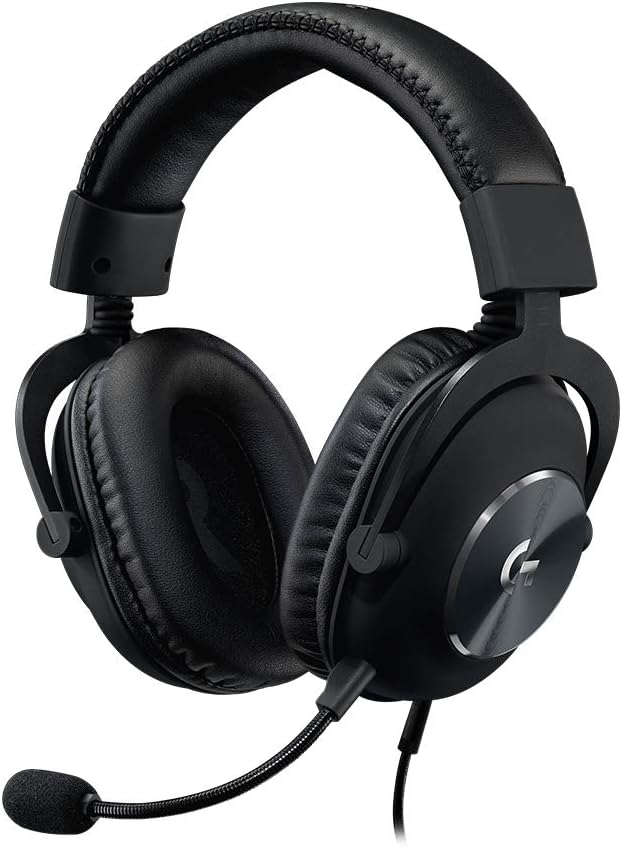
The Logitech G PRO X Wired Gaming Headset earns the top spot because it treats the microphone as a real feature instead of an afterthought. The listing describes a detachable pro grade mic with Blue VO!CE processing, which includes a noise reducer, compressor, and limiter. Those tools are meant to even out your voice and cut harsh peaks. Add 50 mm drivers, memory foam pads, and a metal build, and you get a headset aimed at players who care about both comms and in game sound. Buyers who want a clear step up from a basic headset will see why it leads the group.
On the feature side, the headset ships with a USB external sound card. The listing says the sound card and the Logitech G HUB software are needed for the Blue VO!CE voice tools and for the 7.1 object based surround mode. G HUB also lets you store EQ profiles on the sound card, so your settings can follow you to another PC. Impedance is listed at 35 Ohm, which is easy for a sound card or a desktop to drive without extra gear. Together, those pieces make the headset feel more like a small audio toolkit than a simple pair of cups.
This model suits competitive PC players who want footsteps and directional cues to stand out, plus a mic that sounds tidy on Discord or in team chat. Streamers on a modest setup may like the detachable boom because it can come off when you only want to listen. The choice of leatherette pads for passive isolation or velour for a softer, more breathable feel lets you match the fit to your room and your habits. If you stream or run a team, the saved profiles and voice tools can save you setup time.
The main caveat is that the best voice and surround tools depend on Windows and the G HUB software, so the headset is a more limited fit for a console only setup. The sound card adds one more thing to plug in and carry around. Keep volume at a comfortable level during long sessions, and try both pad types if the listing lets you choose, since pad material changes how warm and how isolated the headset feels. Treat the surround mode as a helpful extra, and spend a little time learning how each EQ preset changes the sound.
Detachable pro grade mic
Blue VO!CE voice filters
EQ profiles saved on sound card
Durable aluminum and steel build
Best features need Windows and G HUB
Extra USB sound card to manage
2Razer BlackShark V2 X Gaming Headset: 7.1 Surround Sound
The Razer BlackShark V2 X is a lightweight wired headset that tries to cover a lot of ground at once. It made the list for three reasons: a cardioid microphone, a simple 3.5 mm connection, and a listed weight of 240 g. That mix makes it easy to plug into a laptop, a controller, or a handheld and get decent voice pickup without installing anything. It reads like a straightforward choice for players who want a no drama headset. Its blend of low weight and broad support is the reason it keeps showing up in recommendations.
The listing calls the mic a HyperClear Cardioid design. A cardioid pickup pattern favors sound from the front and rejects more of what comes from the sides and back, which helps cut keyboard clatter and room noise. The drivers are 50 mm units with titanium coated diaphragms, split into three zones to tune highs, mids, and lows separately. Closed earcups and foam cushions add passive isolation, and 7.1 surround is software enabled on Windows 10 64 bit. Together, those choices aim to keep your voice crisp while keeping outside sound from creeping into the earcups.
This is a strong match for people who switch between devices. The listing names PC, Mac, PS4, Xbox One, and Nintendo Switch, all through the 3.5 mm jack, and it notes that an Xbox One stereo adapter may be required and sold separately. Students with one headset for homework calls and evening games, or families sharing a headset between consoles, will find the plug and play approach practical. Anyone who games on more than one screen will appreciate not having to buy a second headset.
As for caveats, surround sound is limited to Windows 10 64 bit according to the listing, so console players get stereo. A wired 3.5 mm design means you are tethered by the cable length, and there is no wireless option. Because closed cups seal the ear, you may not hear people nearby, so remove one cup when you need awareness. Keep the volume moderate for longer sessions. If you share the headset, wipe the pads now and then so they stay fresh and keep their shape.
Light 240 g body
Cardioid mic reduces side noise
Works across PC and consoles
Closed cups for passive isolation
Surround limited to Windows 10 64 bit
Xbox One may need an adapter
3Logitech G733 Lightspeed Wireless Gaming Headset
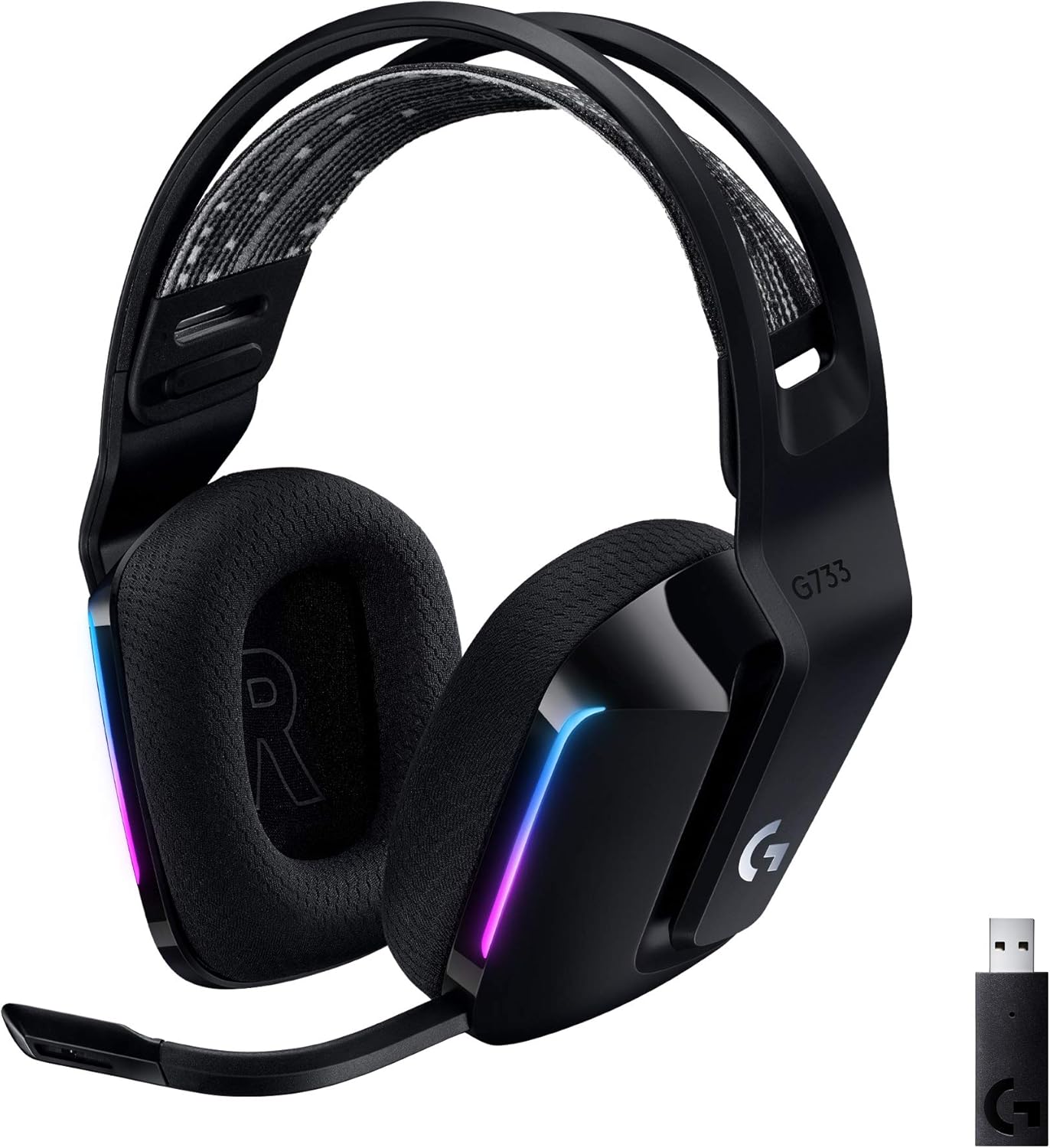
The Logitech G733 Lightspeed Wireless Gaming Headset is the wireless pick on this list. It earned its place by pairing a low lag style wireless link with a mic that has built in voice filtering. The listing gives a 20 meter range and up to 29 hours of play, which are numbers that matter if you hate charging mid week. It also looks different from most black headsets, thanks to a colorful design and RGB lighting. On paper, it is one of the more complete wireless packages in this guide.
The lighting is front facing, dual zone Lightsync RGB with 16.8 million colors, and you can pick presets or build your own through G HUB. The listing describes Blue VO!CE mic filters that aim to make your voice sound richer and cleaner, and PRO-G drivers meant to lower distortion. The headband is a reversible suspension design, which means the weight rests on a strap across the top of your head instead of a hard band. Taken together, these details show a headset built for long evenings of play rather than short bursts.
This headset fits players who want to roam: moving to the couch, getting a snack, or leaving a desk without pulling a cable. It is listed for PC, PS5, PS4, and Nintendo Switch use, and the listing notes stereo play on PS4. Content creators who like a matching desk with colorful lighting will enjoy the customization, and students in dorms often appreciate not being tied to a laptop. It also makes sense for anyone who wants a headset that looks lively on a desk full of gear.
There are trade offs to plan for. A wireless headset needs charging, and battery life depends on volume and lighting settings, so the headline hours are a best case. Software features are tied to G HUB on a computer, which console players will not get. Wireless audio uses a receiver, so keep it plugged in where the signal has a clear path. As always, protect your ears by keeping the volume at a safe level. Updating the software and keeping the receiver close will help you get steady, reliable audio.
Wireless freedom with 20 meter range
Up to 29 hours listed
Customizable RGB lighting
Suspension headband for long play
Needs charging and a receiver
G HUB features are PC based
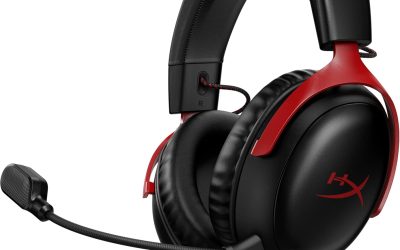
4HyperX Cloud III Wired Gaming Headset for PC
The HyperX Cloud III Wired Gaming Headset puts comfort first, and its listing says so in plain words. It is built for gamers who do not want a sore head to break their focus during a speedrun or a long ranked night. That focus on fit, together with a noise cancelling mic and a rugged frame, helps it stand out among wired options that otherwise look alike. It is an easy headset to explain to a friend who just wants to play without sore ears.
The audio side uses angled 53 mm drivers that the maker says were tuned by its audio engineers to bring out the dynamic sounds of games. The microphone is described as noise cancelling with a built in mesh filter, which helps reduce pops and breathy sounds. A mic mute LED tells you at a glance when you are muted, which saves you from the classic mistake of talking to nobody. The frame is aluminum and described as flexible. Taken as a whole, the design leans toward a calm, steady fit rather than flashy extras.
This model suits people who play for hours at a time, such as strategy fans, MMO raiders, and anyone who streams in long blocks. It lists support for PC, PS5, PS4, and Xbox Series X|S, so it can sit on a shared desk and move between setups. Commuters who game on a travel laptop may like the flexible build, which the listing says resists travel and accidents. It also works for casual players who jump between work calls and an evening match.
On the practical side, the listing gives fewer technical details about the mic arm than some rivals, so check the product page for whether the mic detaches before you buy. Comfort is personal, and a headset that fits one head well may feel loose on another, so look at the return policy. A wired headset limits your range, and keeping volume at a moderate level matters more as sessions get longer. Adjust the headband once, then avoid changing it often, since a steady fit helps the pads seal evenly.
Comfort focused design
Noise cancelling mic with mesh filter
LED mute indicator
Flexible aluminum frame
Mic details are thin in the listing
Wired only
5HyperX Cloud Alpha
The HyperX Cloud Alpha is an older design that remains popular because the formula is simple: a sturdy frame, a comfortable pad, and a mic you can take off. The listing highlights award winning comfort, an expanded headband, and a detachable noise cancellation microphone. For a keyword about boom mics, that detachable arm is the main reason it belongs here, since it lets you keep the headset clean looking when you are just listening. That blend of familiar parts and simple controls explains why the design has lasted.
The drivers use a dual chamber design, which separates the bass from the mids and highs inside each cup so that they interfere less. The listing gives a frequency response of 15Hz to 25,000 Hz and says the fit is over ear. The cable is detachable and braided, with an in line control for audio, which is handy when you want to change the volume without opening a settings menu on a console. In practice, the dual chamber layout is meant to keep effects tidy so that voices stay easy to follow.
This headset suits players who want a reliable, no software wired headset across many systems. The listing states it works with PC, PS4, PS5, Xbox One, Xbox Series X|S, Nintendo Switch, and mobile through a 3.5 mm port. That makes it a decent pick for a family that shares one headset, or for a student who plays on a console at home and uses a phone on the go. It is a sensible pick when you want something sturdy that does not ask you to learn software.
One thing to remember is that a detachable cable and mic are only as good as their connectors, so seat them firmly and avoid yanking the cable. The listing is brief about surround features, so do not expect software tricks and treat it as a stereo headset. It is also a wired model with a single plug, so check that your device has a 3.5 mm port or the right adapter first. Store it on a stand or hook so the braided cable does not get bent into tight loops.
Detachable noise cancelling mic
Aluminum frame and wide headband
Detachable braided cable
Broad device support
No listed surround software
Needs a 3.5 mm port
6NUBWO HG04L Gaming Headset for Xbox Series X
The NUBWO HG04L Gaming Headset is the affordable pick for players who want clear voice chat without a premium spend. It lists a cardioid microphone, a mute button and volume wheel on the left cup, and a braided cable. It is aimed at console players above all, since the title names Xbox Series X|S, Xbox One, PS5, PS4, and Switch. Value minded gamers will find a lot of practical features in the listing. For a first headset or a spare for a second room, it looks like a sensible, friendly choice.
The microphone is described as unidirectional, locking onto sound from the front within a 120 degree pickup angle and filtering noise from the sides and rear. The controls sit on the back of the left cup, where your fingers can find them by touch. Earcups rotate for different head shapes and for one ear listening, and the headset folds to cut its size by a stated 30 to 50 percent, which helps in a bag. In short, the mic and controls are designed so that daily use feels simple and quick.
This headset fits younger gamers, teens, and anyone who needs a first headset that handles party chat on a console. The braided cable is listed at 1.5 m, which is enough for a desk and many couch setups. Memory foam padding and breathable leather are meant to keep long sessions comfortable. Travelers who want a foldable model for a dorm, a hotel desk, or a school bag may also like it. It also fits students who want one folding headset for a desk, a bag, and a lounge.
Keep expectations in line with the category. The listing says the sound is Hi-Fi stereo, so there is no surround software to count on. The 1.5 m cable is shorter than some, so you might need an extension for a distant TV. Parents buying for kids should supervise play and keep the volume low. The pad material can feel warm in summer, so give your ears breaks during long sessions. If the mic sounds too quiet, try moving it a little closer rather than raising the volume.
Cardioid mic with 120 degree pickup
Mute and volume wheel on the cup
Foldable, rotatable earcups
Affordable feature set
Stereo only, no surround software
Cable is only 1.5 m
7V-Moda BoomPro Microphone for Gaming & Communication
The V-Moda BoomPro Microphone is not a headset, and that is exactly why it belongs on a boom mic list. It is a detachable boom mic with a flexible arm that you attach to compatible headphones. The listing describes improved voice clarity and reduced background noise, and says it suits both gaming and working from home. If you already own a good pair of headphones, this is a way to add voice chat without replacing them. For someone with a favorite pair of headphones, the idea is easy to understand.
The mic comes with a clip on controller that includes a mute button and a volume wheel, so you can adjust things without reaching for your phone or console. The cable is described as reinforced yet lightweight, and the connector is gold plated. The flexible boom lets you place the capsule close to your mouth, which is the main way to get a stronger signal compared with a mic that sits farther away. Overall, the accessory is built to be small, light, and quick to attach or remove.
This product suits people who like their current headphones and want to add comms, such as students who study with a headphone setup and game a few nights each week. The listing states it works with all V-MODA Crossfade series headphones and any headphones that use a 3.5 mm cable input. Remote workers who join calls and then play games after hours may like having one mic for both. It is also useful for people who want to switch between music listening and team chat without swapping gear.
The caveat is compatibility. Because it plugs into a cable input, you need headphones with a matching 3.5 mm socket, so check your model before buying. It will not add sound features to your headphones, and it will not work with wireless only models. The clip on controller adds a small bit of cable weight near your chest. Keep the boom a few fingers from your mouth, and do not turn up the volume to compensate for noise. Wrap the cable loosely when you store it so that the thin wires stay in good shape.
Flexible boom for good placement
Clip-on mute and volume wheel
Reinforced lightweight cable
Adds a mic to existing headphones
Needs headphones with a compatible input
Not a headset by itself
How to Choose the Best Gaming Headsets With A Boom Mic
Why a boom mic still matters for gaming
A boom mic sits on an arm that places the capsule near your mouth, and that distance is the biggest reason it tends to sound clearer than a tiny mic hidden in an earcup or a cable. The closer the capsule is to your voice, the stronger your voice is compared with room noise, which lets teammates hear you without turning up gain. That is why many players treat the mic as a core feature, not a bonus.
Placement is not the only factor. The pickup pattern, the quality of the capsule, and any filtering all shape what your friends hear. A boom mic that you can move and, in some models, remove gives you more control over each of those. That control is why the format has stayed popular in esports and casual play alike. It also keeps your voice consistent from match to match.
Detachable versus fixed mic arms
A detachable mic arm lets you remove the boom when you want to watch a video or listen to music in public, and it also makes it easier to replace the part if it ever gets damaged. It is the most flexible design, and several picks in this guide use it. The only drawback is a connector that can wear if you remove it every day. That simple choice affects how you will use the headset day to day.
A fixed or flip up mic keeps everything attached, which is simpler and less likely to be lost. Some flip up designs mute the mic when raised. Check the listing for words like detachable, flexible, or adjustable. If the page does not say how the mic works, treat it as an open question and read the product description before you buy. Think about how often you move around before you decide.
Cardioid and noise cancelling mics explained
A cardioid mic picks up sound mainly from the front and rejects sound from the sides and rear. In a room with a loud fan or a clicky keyboard, that pattern helps keep your voice in front. Two picks here describe a cardioid or unidirectional design, which is a sign the maker cared about directional pickup. It helps to read the fine print, since makers use these terms loosely.
Noise cancelling mic is a broader label. It can mean a physical design that favors close speech, software filters that reduce steady background sound, or both. Neither method is magic, and a very loud room will still leak in. For best results, keep the mic in the same spot, speak at a normal level, and avoid breathing directly onto the capsule. A short recording of your own voice will show you the difference.
Wired or wireless for voice chat
Wired headsets send audio through a cable, so they do not need charging and rarely suffer from dropouts. They also tend to be simpler to connect to a console or a PC. The trade off is that you are tethered to your device, and a cable can snag on a chair or a desk if you move around a lot. Your room, your device, and your habits should decide this one.
Wireless gaming headsets usually use a small USB receiver instead of Bluetooth, which keeps delay low and keeps voice in sync with the action. You gain freedom to move, but you also need to charge the headset and keep the receiver in place. If you mostly sit at a desk, wired is often the easier route. If you roam, wireless is worth it. Neither type is better in every case, which is why both appear here.
Understanding drivers and sound quality
The driver is the speaker inside each earcup, and size is only part of the story. Several headsets here list 50 mm or larger drivers, which are common in gaming models because they handle low bass and loud effects well. What matters just as much is tuning, because the way a driver is voiced decides whether footsteps stand out clearly or get buried under explosions. A good headset balances all of these pieces instead of chasing one number.
Open the listing and look for details about frequency response, impedance, and any sound card or software. A headset with a lower impedance is easier to drive from a phone, controller, or laptop. Higher impedance can need an amplifier. Remember that surround modes on gaming headsets are usually software based and are sometimes limited to a certain operating system. Use the listing facts as a guide, not as a promise of how it will sound.
Comfort, weight, and ear pads
Comfort decides whether you keep a headset on for one match or ten. Weight, clamping force, and padding all play a part. A light body helps your neck, and a suspension headband or wide band spreads pressure across the top of your head. Memory foam pads mold to your ears and can feel soft right away. A good fit is hard to measure from a page, so use return terms as a safety net.
Pad material changes the feel. Leatherette gives good passive isolation but can warm up over time, while velour is more breathable but may let in a little more outside sound. If you wear glasses, a softer pad with a deeper cushion usually seals better around the frames. Take short breaks, and keep your listening volume at a safe, comfortable level. Try the headset for an hour or two before you decide to keep it.
Console and PC compatibility
A 3.5 mm plug is the most universal connection for gaming. It works with many controllers, handheld consoles, laptops, and phones, which is why wired headsets with this plug show up on so many lists. On some consoles you may need a special adapter, so always read the compatibility notes on the listing. It pays to double check this before you add anything to your cart.
USB sound cards and wireless receivers add features like surround and voice processing, but they usually need a computer and software. A headset that mentions PC only features in its fine print may behave as a plain stereo headset elsewhere. Match the connection to your main device first, and treat extras as a bonus if you also play on other platforms. One quick look at the platform list can save you a return.
Mute buttons and on cup controls
Quick mute and volume controls make a bigger difference than most buyers expect. When a family member walks in or you need to cough, a mute button within reach saves you from a loud moment on the voice channel. A visible mute light, as found on one pick here, adds a second layer of confidence. Small touches like these are easy to overlook until you need them.
Controls can sit on the cup, on the cable, or on a small clip on module. Cup controls are tidy and travel well, while in line modules are easier to reach if the cable runs down your chest. Choose whichever fits your hands and your play style, and keep your fingers clear of the cable when you move. Try to find controls that you can use without looking down.
Build quality and durability
A gaming headset takes plenty of knocks: tossed on a desk, stuffed in a bag, or left on a chair. Metal frames, such as aluminum or steel, add strength where plastic can crack. Several picks in this guide mention aluminum parts, which suggests the makers aimed for a long working life. Looking after your gear in simple ways keeps it working longer.
Cables and mic connectors are common weak points. Braided cables resist tangling and wear, and detachable cables are easier to replace. Pads wear out first on most headsets, so look for a model with pads that are easy to swap. A little care, such as hanging the headset on a stand, extends the life of any design. Spare pads and cables are worth keeping in mind if you play every day.
Getting the best voice quality from any boom mic
Even a great mic can sound poor if it is set up badly. Position the capsule a couple of finger widths from the corner of your mouth, not directly in front of it, so that breath does not hit it. Speak at a steady volume and keep the arm in the same place from one session to the next. A few minutes of setup usually fixes most voice problems.
Check your system settings too. Choose the headset mic as the input in your game or chat app, set the input level so that normal speech fills about half the meter, and avoid boosting gain too far, which adds hiss. If your headset has software filters, try modest settings first, since strong filters can make a voice sound thin. Ask a friend to listen and tell you how you sound.
Safe listening volume for long sessions
Gaming sessions can run for hours, and loud sound for a long time is tiring. Keep the volume at a level where you can still hear the people around you, and lower it if sound feels sharp or uncomfortable. Closed cup headsets block outside sound, so you may be tempted to turn them up more than you need. Small habits protect your hearing over time without spoiling the game.
Take short breaks, and switch to speakers now and then if you can. Parents who buy headsets for younger players should supervise play and set sensible limits on volume and time. If you ever feel ringing or discomfort, stop and rest. This guide is shopping advice only and does not replace advice from a professional. Sharing the guideline with younger players helps them build good habits.
Budget, value, and when to spend more
A more affordable headset can still offer a decent mic, comfortable pads, and a solid cable. The listing for the value pick in this guide shows how far basic features can go. Where you notice a gap is usually in software, in finer tuning, and in the build of the mic arm and the frame. Value is about matching features to your needs, not chasing the longest spec list.
Spending more tends to bring detachable parts, better filtering, wireless links, or companion software. It is smart to decide which one of these matters most to you before you shop. If you only play on one console and want a simple setup, a lower cost model may be plenty. If you stream or compete, extra control is worth considering. Be honest about what you will use, and skip the rest.
How to choose the right headset for your setup
Start with your main platform, then pick the connection type. Next, decide whether you want a detachable mic or one that stays attached, and whether wireless freedom matters. After that, compare comfort details such as weight, pad material, and headband style. Each step narrows the field fast, and you can skip anything that does not fit. A simple checklist keeps the choice calm and clear.
Finally, read the product page for return terms and warranty details, since fit is personal and mics vary. If you already own good headphones, a boom mic accessory can be the most economical upgrade. If you are starting fresh, choose from the picks above based on the feature you value most: comms tools, comfort, or freedom. If two models seem close, pick the one with the better mic.
Frequently Asked Questions
What makes a boom mic better than a built in mic?
A boom mic puts the capsule close to your mouth, so your voice is stronger compared with background noise. Many also let you adjust the position or remove the arm, which gives you more control over how you sound on voice chat.
Is a detachable mic better than a fixed one?
A detachable mic is flexible because you can take it off when you only want to listen, and you can replace it if it breaks. A fixed mic is simpler and harder to lose. The best choice depends on how you use the headset every day.
Do these headsets work on PlayStation and Xbox?
Most picks list support for PC and major consoles through a 3.5 mm jack, but details vary. The listing for each model names the platforms, and some Xbox consoles may need an adapter. Always check the compatibility notes on the live product page first.
What does a cardioid microphone do?
A cardioid microphone picks up sound mostly from the front and reduces sound from the sides and back. That helps cut keyboard clicks, fans, and room noise, so teammates hear your voice more clearly during busy matches.
Is wireless good enough for competitive play?
Gaming wireless headsets that use a dedicated USB receiver are designed to keep delay low, so many players use them for ranked games. The trade off is charging and keeping the receiver in range. Wired models skip both concerns entirely.
Can I use the V-Moda BoomPro with any headphones?
The listing says it works with V-MODA Crossfade headphones and headphones with a 3.5 mm cable input. It will not work with wireless only headphones or models without a matching socket, so confirm your connection before buying.
How should I place the mic for the best sound?
Place the capsule about two finger widths from the corner of your mouth, slightly off to the side so breath does not hit it. Keep the arm steady, speak normally, and set the input level so that speech fills about half the meter.
Do I need software for these headsets?
Plug and play models need none, but some features depend on software. For example, the Logitech models use G HUB for voice and lighting tools, and surround on the Razer model is software enabled on Windows 10 64 bit.
How loud is safe for long gaming sessions?
Keep the volume at a comfortable level where you can still hear people nearby, and take short breaks. Closed cup headsets block outside noise, so it is easy to turn them up too far. Supervise younger players and keep volume low.
Which headset is best for a small budget?
The NUBWO HG04L is the value pick here, with a cardioid mic, on cup controls, and foldable earcups. It is stereo only and has a shorter cable, so check that these trade offs suit you before you buy.
The Bottom Line
The best gaming headsets with a boom mic give you clear voice chat, a comfortable fit, and controls that are easy to reach. Our top pick is the Logitech G PRO X Wired Gaming Headset for its detachable pro grade mic and PC focused sound tools.
If you want console friendly simplicity, look at the Razer BlackShark V2 X. For wireless play, choose the Logitech G733. Check each live listing for current price and availability, then keep your volume at a safe level and enjoy the game.
Updated for the 2027 buying season. Amazon listings and availability change often, so check the product page for current details.
Write Your Review
No reviews yet. Be the first to share your experience!